How to Align Distributed Content Teams Around a Shared Strategy
A practical guide to aligning distributed content teams: shared briefs, async rituals, tooling, and a source of truth that survives time zones.


You’ve got in-house marketers in one time zone, freelancers in another, and an agency partner juggling three other clients, all working together to ship one campaign. The strategy is clear and the team is skilled, but execution often falls apart. Even with the right content team roles in place, a distributed setup can erode alignment fast.
Strategy lives in a doc no one opens after kickoff. Tasks live somewhere else entirely. And people start working toward different goals, losing sight of what Kasey Steinbrinck, Senior Content Marketing Manager at Sinch, calls the real “North Star.”
“People get focused on meeting deliverables or specific KPIs and forget the big picture.” “If doing what’s right for the customer and the target audience isn’t everyone’s North Star, then you’re missing the point.”
The Content Studio’s State of (Dis)Content, a July 2024 survey of 545 content marketers, found that 43.3% named aligning content efforts across multiple teams as a challenge, putting it fourth behind lack of resources, access to subject matter experts, and workflow and approval problems. Two of those four are downstream of the same thing, which is why teams that fix how they collect insight from SMEs often find the alignment problem shrinks with it. So, how do content teams keep strategy and execution connected even across distributed setups?
We asked Kasey and other experts, including:
Leah Alves-Hill, SEO Manager at Qwilr when we spoke, now Growth Marketing Manager there
Kaitlin Milliken, Senior Program Manager at HubSpot
Sean Collins, then SEO Content Manager and now Head of Content at Scoro
Janine Anderson, Content Operations Manager at Zapier at the time of our conversation
Tom Shapiro, CEO of Stratabeat
Hailley Griffis, Director of Communications and Content at Buffer
Here’s what they suggest.
Why strategy often breaks down across distributed teams
Strategy may look solid at kickoff, but it quickly wobbles as teams return to their corners: misaligned deliverables, inconsistent messaging, and conflicting priorities.
This tunnel vision happens for a few key reasons:
Documentation without context disappears into the void. That beautiful strategy deck in Google Drive? Without links to daily work, it’s just something everyone nodded at once, then forgot.
Casual reinforcement conversations don’t happen. Distributed teams miss the quick check-ins, coffee chats, and “hey, quick question” moments that naturally keep everyone aligned in an office.
Top-down processes kill diverse perspectives. Leah learned this firsthand while managing her distributed content team:
“I initially did these very in-depth content briefs that really didn’t include a lot of room for writers to include their own research, creativity, or ideas. Because the briefs were too rigid and all coming from one person, we ended up with cookie-cutter articles.”
Top-down strategy kills distributed teams’ biggest strength: fresh ideas from remote teammates, freelancers, and agency partners. Teams focus on hitting deadlines and word counts instead of creating content that serves the audience. That is doubly wasteful when you have hired freelancers who can shape strategy and then briefed them as if they could only execute.
Create a single source of truth
A single source of truth brings all your content standards, workflows, and assets into one place so your team always works from the same page.
This could be a shared Google Drive, a Notion or Trello board, or a pinned Slack channel, as long as it’s accessible and regularly updated.
For HubSpot, this single source of truth takes the form of a simple email system combined with Asana. Kaitlin explains their approach to keeping their distributed writing team aligned:
“We send each writer one email with every link they need: the original article, Asana card, instructions, and a group Google Doc (for refreshes).”
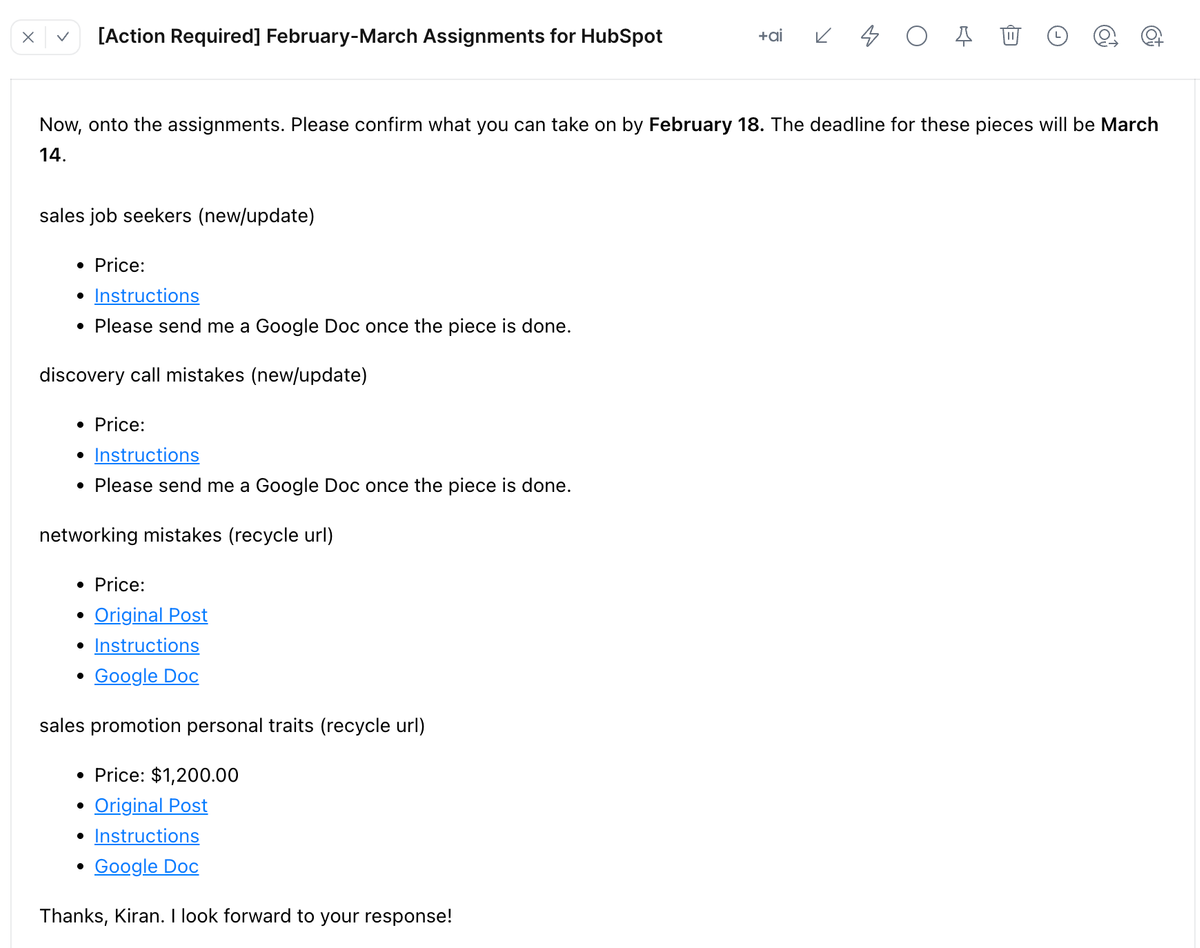
This workaround gives writers one entry point even when the team runs on several tools.
Relato consolidates everything your content team needs into a single workspace, which keeps the Frankenstack from forming in the first place.
The dashboard, for example, gives you a bird’s eye view of project status across all workspaces, team workload distribution, and individual contributor capacity.
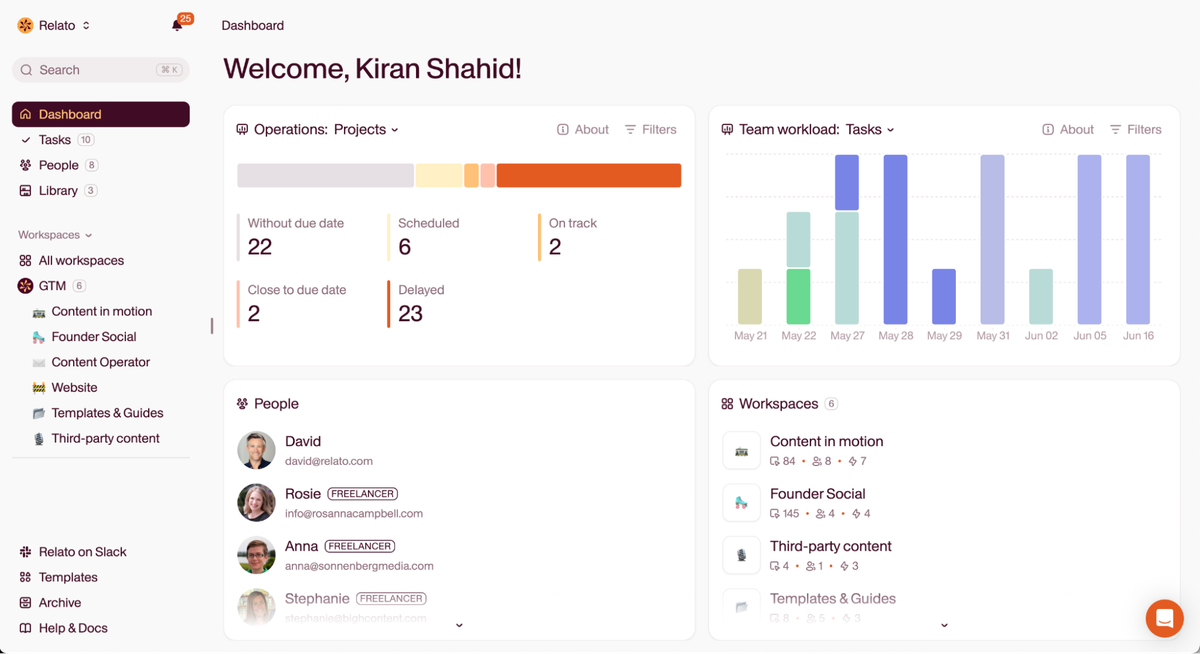
See what’s on track, delayed, or bottlenecked without switching tools or requesting updates.
Relato’s Library is your central asset hub with briefs, content, interviews, and filterable labels to keep everything organized.
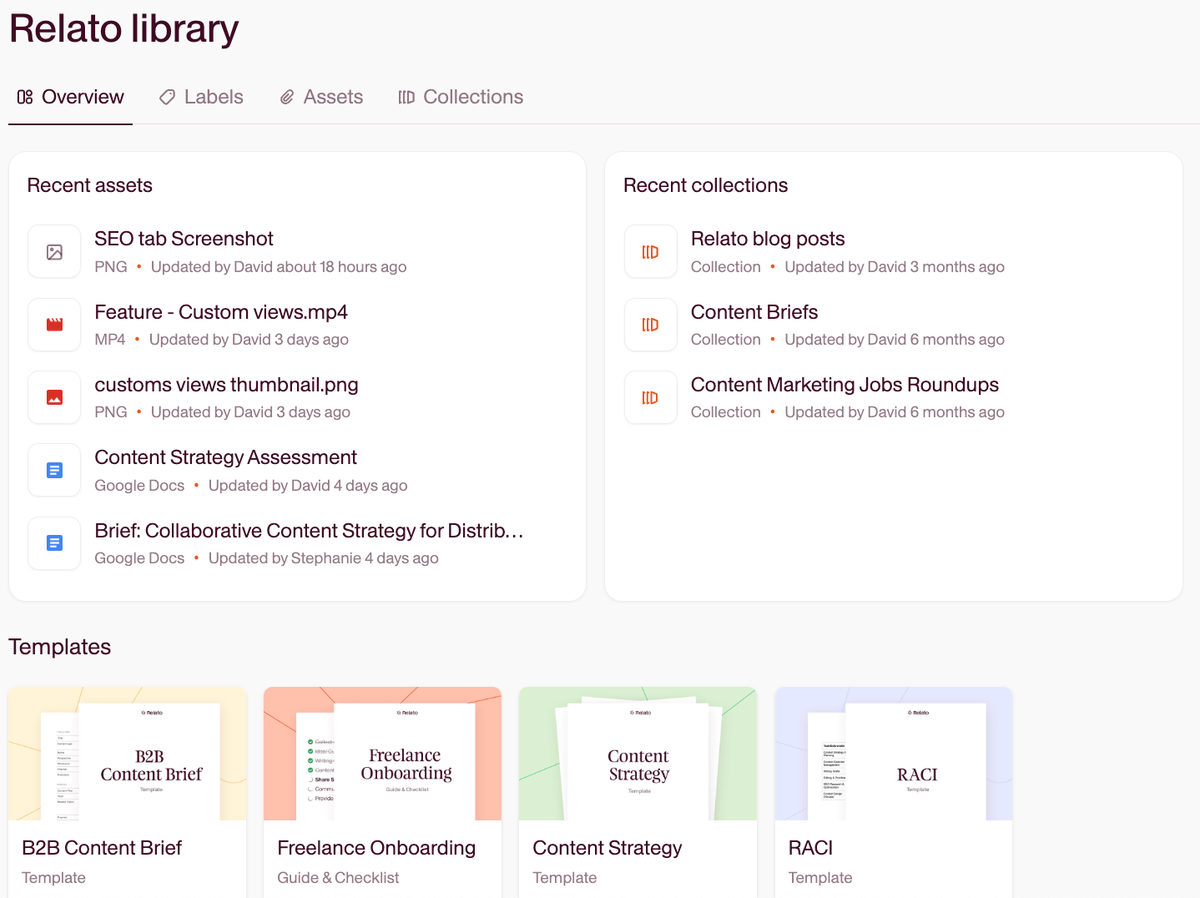
Instead of hunting across Google Drives, Slack channels, and various wikis, you can host all these essential documents in one searchable location:
Strategy docs like audience personas, editorial calendar, KPIs
Brand guidelines like voice/tone guide, writing dos and don’ts
Content briefs
Product info like feature descriptions, product screenshots
Technical guidelines like SEO best practices, formatting rules
Audience personas
Note: See what you have before creating duplicate resources. Sean uses the knowledge base for getting their content team up to speed: “Honestly, one of our best tools is our own Help Center. The articles are detailed and written clearly enough that content creators — internal or freelance — can get up to speed fast without needing constant input from product teams.”
Once you create your hub, maintain it actively. “If there’s a really important product or process update, I’ll contact writers directly with the supporting documentation,” says Leah. Regular updates prevent duplicated work, missed deadlines, and version confusion.
When everyone can easily find what they need without gatekeepers or bottlenecks, work flows more smoothly, and content quality naturally improves.
Streamline communication to reduce overload
Clear expectations on info, requirements, and feedback timelines eliminate constant check-ins.
Grammarly’s 2024 State of Business Communication report, produced with The Harris Poll, highlights how effective and poor communication have ripple effects across your team. Grammarly has since continued the series, and its most recent edition at the time of writing is The Productivity Shift, published February 2025:
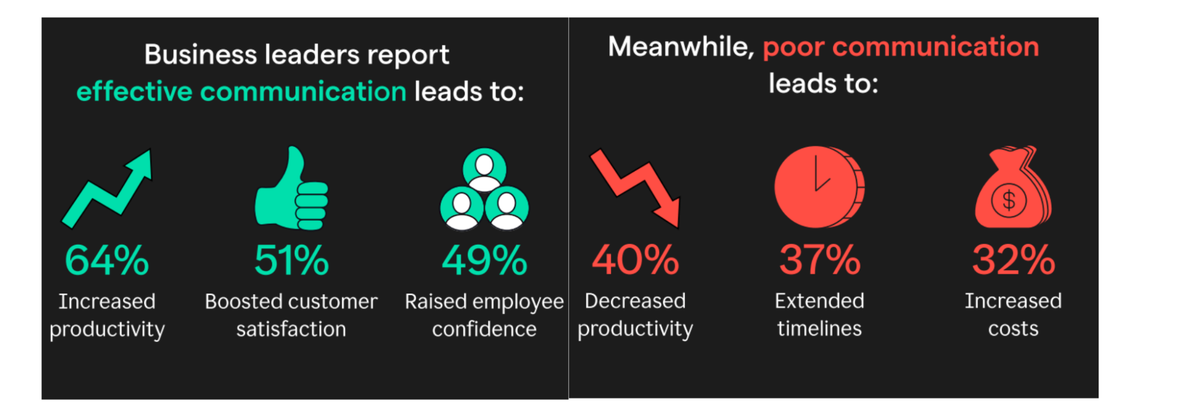
Here’s how to set up a system that keeps communication lean and useful:
Keep communication simple and purposeful
Communication can easily become a source of friction instead of clarity. Strategic decisions get buried, quick questions become 30-minute meetings, and team members waste time chasing updates. When RAYVN’s lean team made its status visible in one workspace, those recurring check-ins shrank because there was nothing left to chase.
The fix isn’t “more communication”: it’s using the right format for the kind of message you are sending.
Kasey uses a flipped meeting approach to make the most of limited overlap across time zones:
“One of the things I’ve found challenging in a distributed team across time zones is finding time to collaborate remotely. Instead, it’s more effective to send a recorded presentation in advance. That way, when we meet, we can use the time for Q&A and brainstorming — you might even end early.”
This shift frees up meetings for high-value collaboration and cuts passive listening. Editors can apply the same principle with quick Loom walkthroughs for content feedback and give writers clarity without needing to hop on a call.
Leah takes a similar approach when it comes to async learning. She stopped running live SEO workshops and replaced them with a self-serve doc that writers could revisit as needed. As a result, live meetings were reserved for discussion while documentation alone worked for reference.
Tom also keeps daily communication structured and purposeful with a two-tier system:
“We manage communications in a centralized online project management platform (previously Basecamp and now ClickUp). For quick conversations and check-ins, we use Slack.”
That separation (structured work in one place, real-time nudges in another) cuts back on endless notifications and helps everyone find what they need, fast.
Zapier takes this further with automated distribution for their high-volume operation. “We publish more than 100 blog posts a month, some of which are really important for other teams to know about,” explains Janine.
“We use a Zap that posts every new blog article to a Slack channel via the RSS feed. For more targeted internal distribution, we also have scheduled Zaps that post blog digests in relevant Slack channels, like one for partner managers that highlights articles about key apps on the Zapier platform.
“This reduces questions from teams about relevant new content and saves them from having to hunt for updates.”
Strong communication across teams needs clear channels, clear goals, and automation. When you’re producing a lot of content, manually sharing it slows everything down. Set up systems that automatically update the right people so your team can focus on creating, not coordinating. Worth knowing before you build it all in Zaps: per-task pricing climbs with publishing volume, and we compared the Zapier alternatives for content teams on exactly that trade-off.
Be rigid on deadlines, flexible on execution
Deadlines keep async workflows from stalling. Kaitlin works with a large pool of freelancers and emphasizes fixed timelines to reduce confusion and keep work moving.
“A lot of these changes are happening async for our freelance writers because we have folks all over the world, so we just kind of build in set deadlines, and we give people a week to make revisions if we have to send a piece back.”
Fixed timelines reduce back-and-forth and let writers work in their time zones. But not every team requires this structure.
When working with a small pool of trusted writers or creating thought leadership pieces that require deeper research, writers can set their own deadlines based on their bandwidth and creative process. Decide based on your content goals.
Set boundaries around feedback and reviews
Content reviews derail timelines when stakeholders delay or request endless changes.
Kasey offers practical advice for keeping the review process from becoming a bottleneck:
“The best advice is simple: limit the number of people involved in the content review process as best you can. Then, give very clear deadlines and build a little margin into the review process to make room for last-minute requests.”
The more cooks in the kitchen, the slower (and messier) the content gets. Keep it lean with clearly assigned roles.
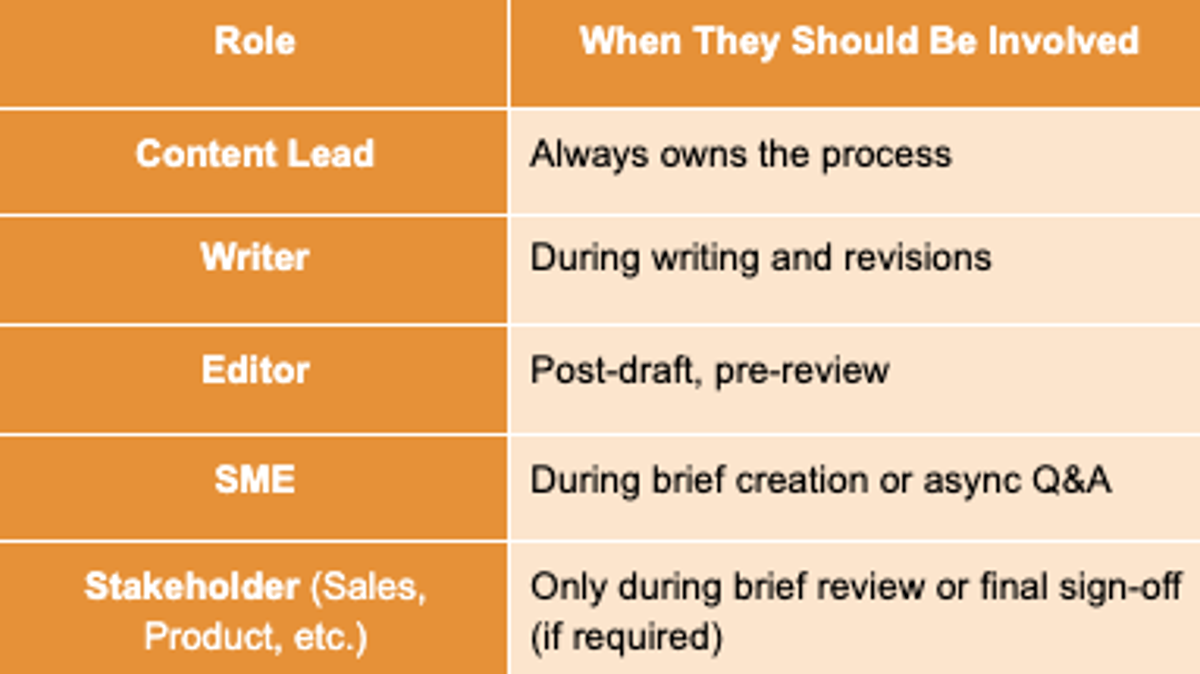
Limiting reviewers to three to four people and setting response deadlines creates a feedback system that delivers decisions quickly rather than endless revision cycles.
Cut the noise. Streamline how your team communicates.
Relato keeps deadlines, feedback, and updates in one place so distributed teams stop chasing Slack threads.
Build systems that support distributed teams
You need clear systems to assign work, track progress, and minimize back-and-forth communication. These are the operational foundations that keep distributed teams efficient and aligned.
Onboard team members for long-term success
One of the most effective ways to improve content quality in a distributed team is to strengthen your onboarding process. A strategy-led freelance onboarding process sets clear systems upfront, which reduces revisions later and helps contributors deliver strong work from the start.
Sean built a simple one-pager that gives new writers everything they need to get up to speed.
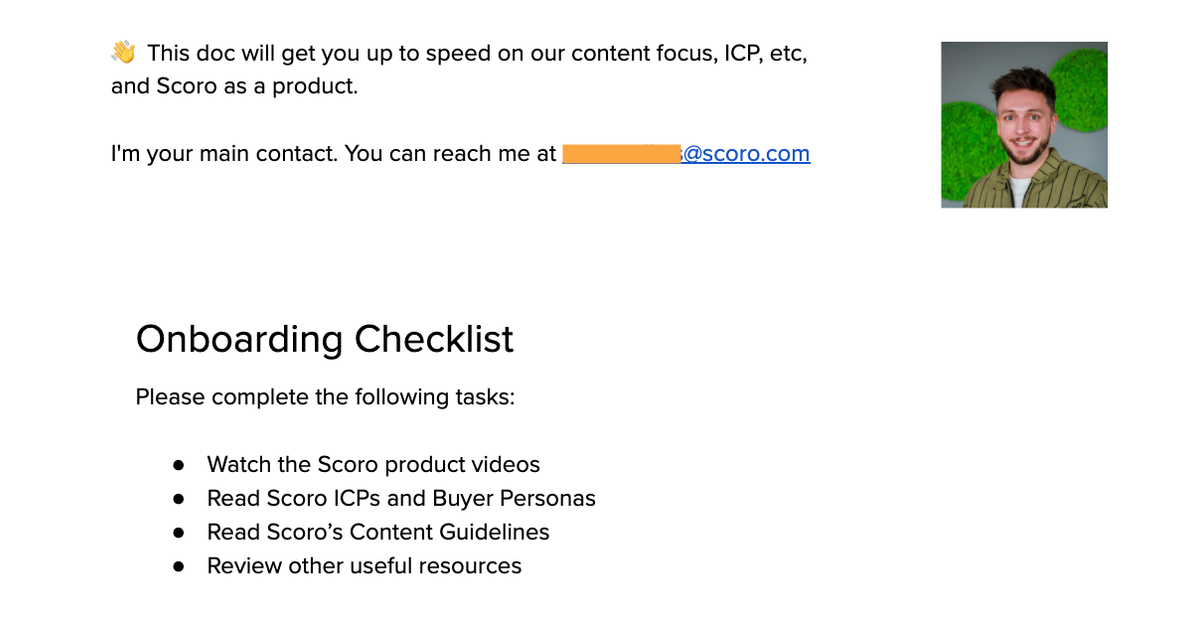
The one-pager includes:
Intro + contact info: A quick welcome message and a note telling them he’s their main contact for any questions
Onboarding checklist: Tasks like watching product demos, reviewing personas, and exploring the Help Center
Product 101: A plain-language summary of what Scoro does and who it serves
Content focus: Key content themes like profitability, operations, and resource planning
Writing guidelines: A detailed blog guide covering tone, structure, and formatting
With clear expectations in place, writers ramp up faster and can work more independently, without needing constant check-ins or clarification.
Buffer takes a similarly thoughtful approach to onboarding, especially when it comes to helping contributors internalize their brand voice. Rather than relying solely on style guides, they treat the early editing process as a hands-on learning experience.
“For both new teammates and freelancers, we set clear expectations that editing will be heavier at the beginning to ensure the voice and tone matches what we write for the Buffer audience,” says Hailley Griffis, Director of Communications and Content. “Rather than just correcting, we use these early edits as moments to get into the nuances of our brand voice.”
Of course, onboarding is even easier when you’ve taken the time to find strong writers in the first place. Leah pairs smart hiring with clear systems from day one.
“I opted to find incredible writers and onboard them in a way that really set them up for success by providing docs like an internal linking matrix.
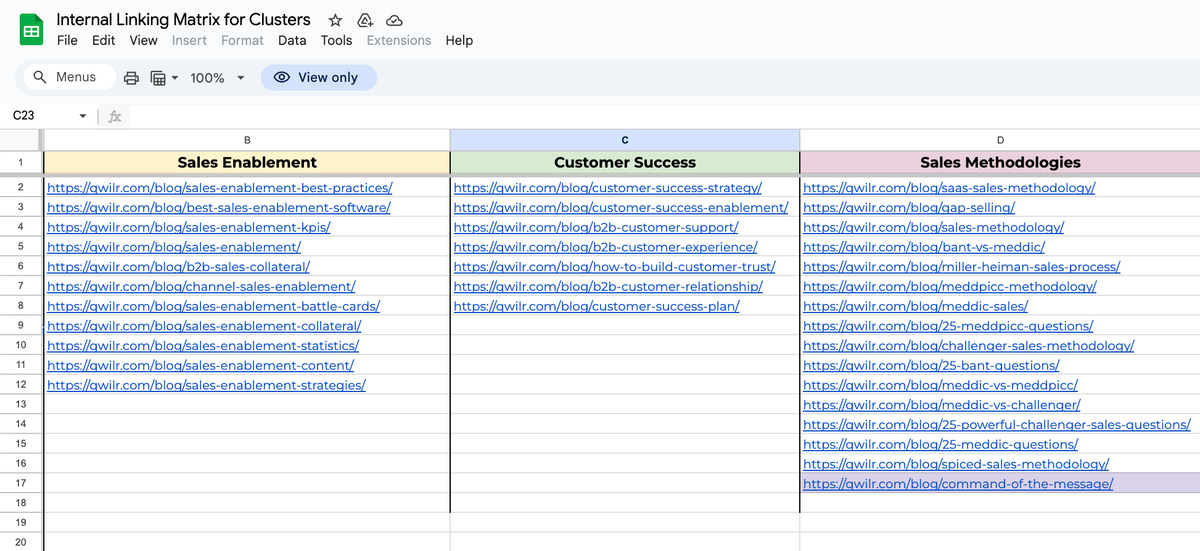
I also have a checklist I use for optimizing pages during SEO updates, and I baked that into our onboarding so writers can create fully optimized pieces from the start, instead of us fixing things later.”
Smart hiring, plus structured onboarding, builds trust and reduces future revisions.
Leave room for creativity
Find the sweet spot between strategic direction and creative freedom to allow contributors to bring their unique perspectives while maintaining brand consistency.
Kaitlin and Tom both set broad parameters while giving writers room to make content their own.
For example, HubSpot gives writers “broad instructions like ‘write the piece in first person or test a tool and tell us how it went.” But what that looks like is up to the writer’s experience.”
Tom also gets on brainstorming sessions with the team, treating them as structured creative exercises rather than free-for-alls, even when they’re remote.
“We love to brainstorm in small groups, and this works just as well over Zoom as it does in person. Typically, we give the participants the specific topic ahead of time so everyone can start thinking of content ideas even before we get together.
Sometimes we’ll use a shared matrix to help us evaluate the ideas, assessing each idea against the time required, effort, cost, anticipated results, and ROI. The matrix makes it very clear which ideas to pursue and which to save for another day.”
Here’s what that might look like:
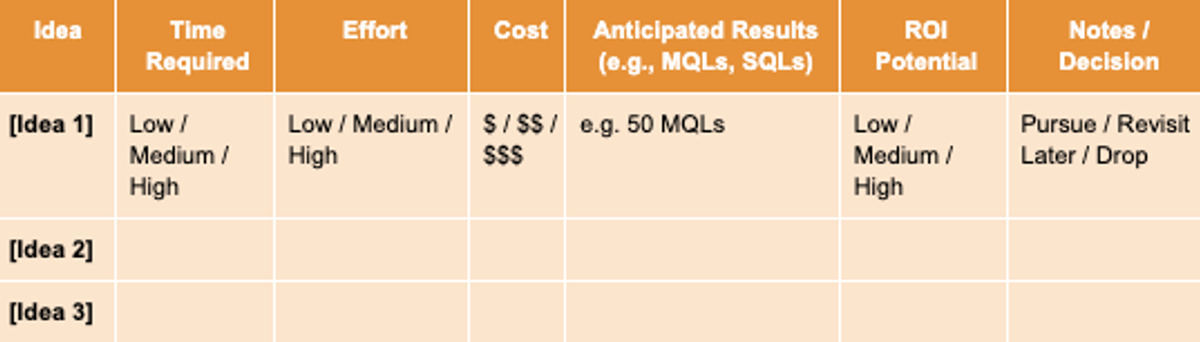
Creative energy doesn’t have to suffer in remote settings, as long as the format encourages focused thinking and gives the team a straightforward way to evaluate what’s worth acting on.
Meanwhile, Leah stresses balancing creative freedom with tactical guidance:
“I still believe in having SOPs, especially granular ones. I used to assume writers knew what I meant with SEO or formatting terms, and it caused a lot of unnecessary back-and-forth.”
These leaders apply the same principle: balance structure with flexibility. Here’s how that varies across content types:
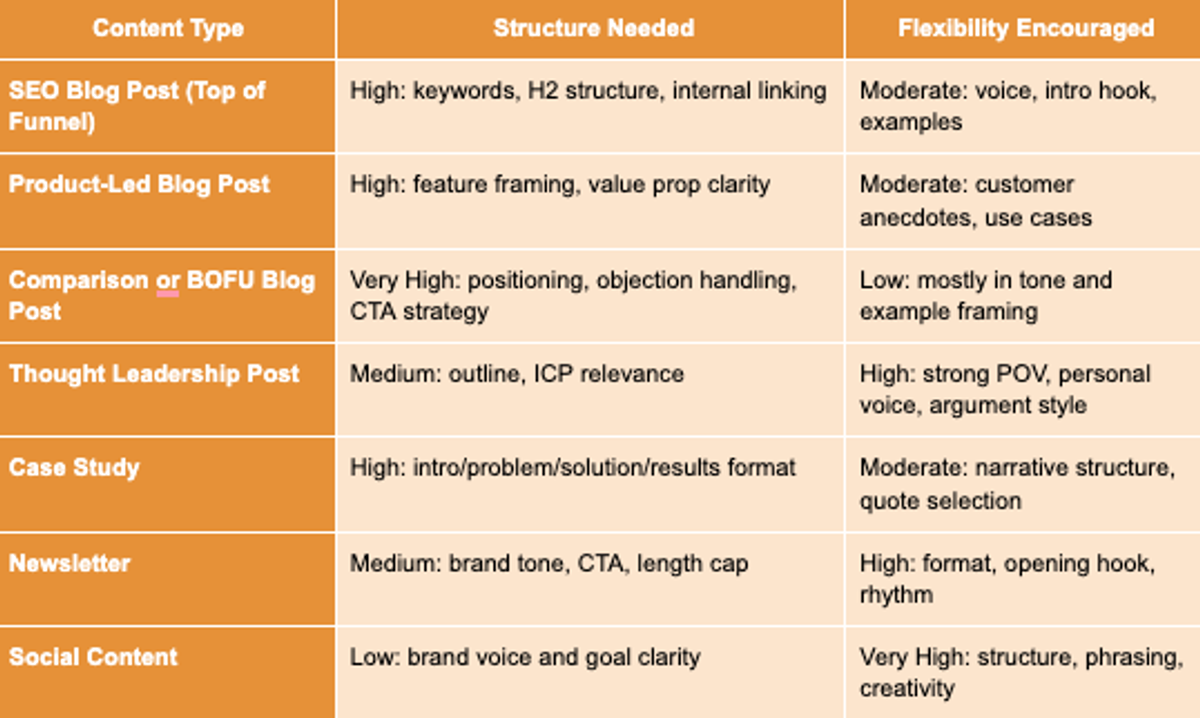
Prioritize what’s important for momentum and what requires deep thinking. As Hailley says, “Not every piece of content needs hours of contemplation, but for pivotal projects or strategy work, we deliberately create a space for deep thinking.”
Make work visible to reduce check-ins
When everyone can see where work stands, who’s involved, and what’s coming next, there’s less need for check-ins and more room for actual progress. Unlike general-purpose tools like Notion or Asana, Relato is built specifically for content teams.
The workspace view shows who’s tackling what in real time. You can toggle between Kanban, calendar, and table views, depending on how your team prefers to track progress.
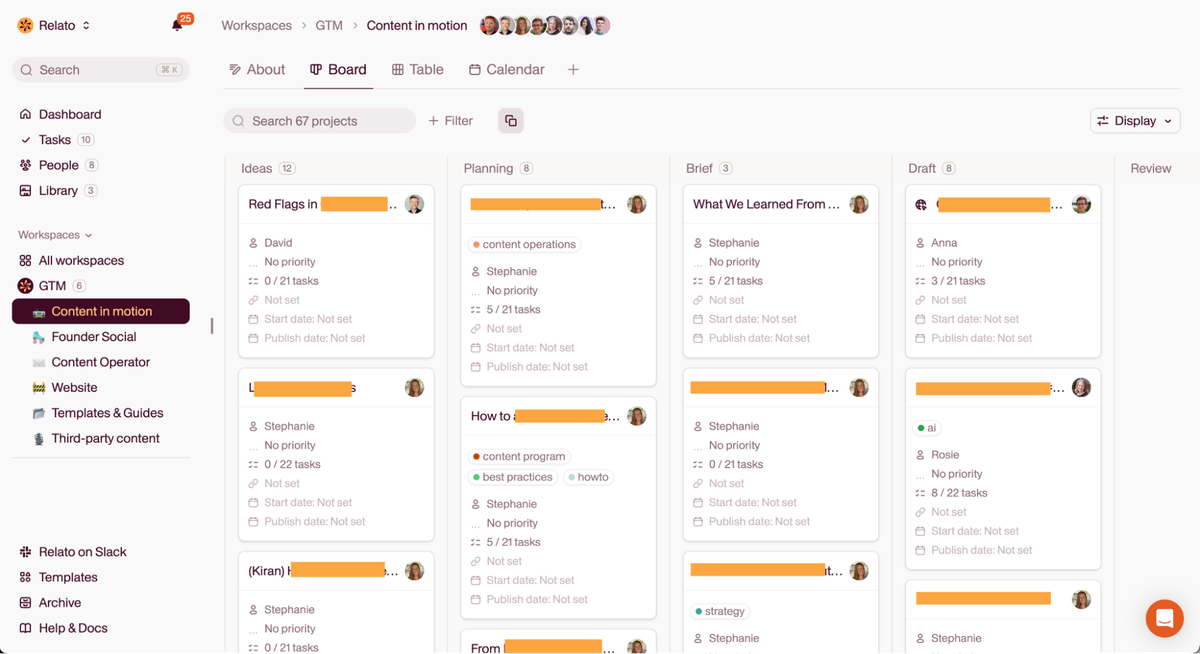
Whether it’s a pipeline or a content calendar, everything lives in one place.
Open a task card, like a blog post or case study, and view the steps, content team roles, and responsibilities clearly laid out.
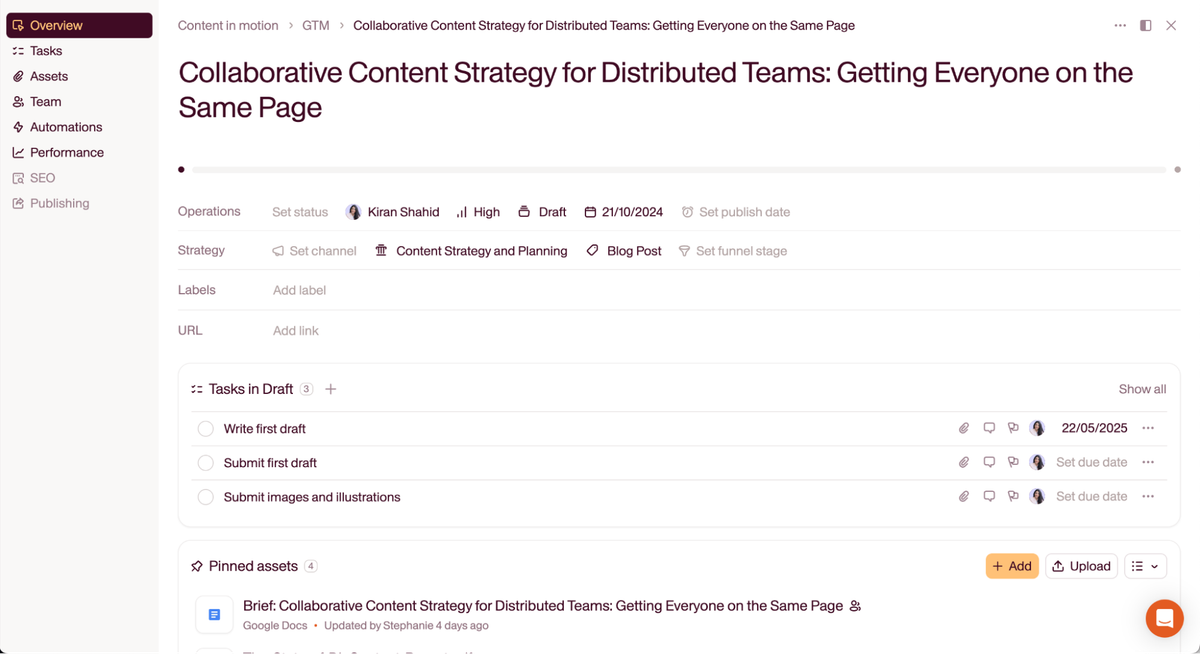
Each task clearly shows who’s responsible for what, along with assigned roles like writer, editor, or reviewer.
This makes it easy for everyone to understand where they fit and what’s expected.
Pro tip: When choosing tools, consider who needs access beyond your core team. The Zapier team prefers Airtable. As Janine says, “It’s easy to give access to non-team members who need to observe our process but not change anything within it.”
Relato takes this further with role-based access and customizable labels like “Freelancer” or “Agency Partner,” so you can control who sees what. Kalyna Marketing runs that setup across a client roster, with one project per client and freelancer access scoped to a single client’s work.
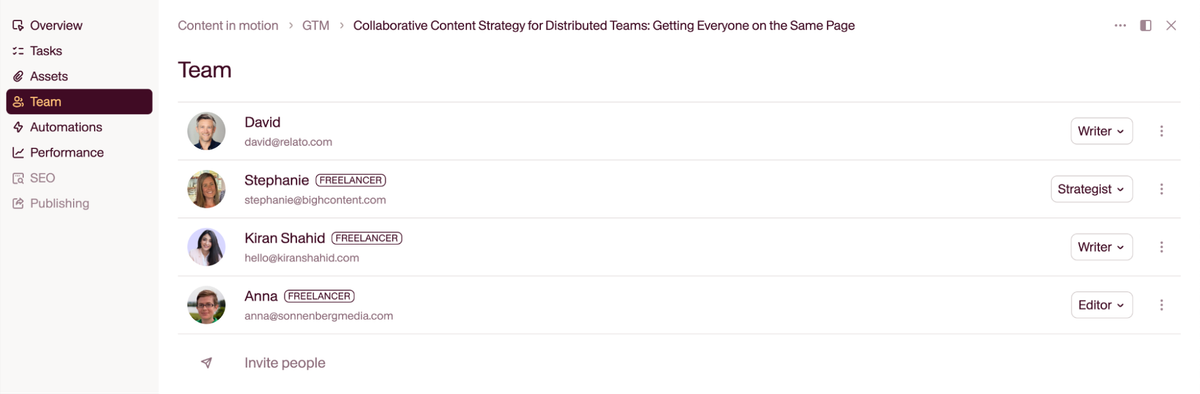
That means external collaborators get the visibility they need to stay aligned, without risking accidental edits or confusion.
Instead of forcing you to patch together docs, databases, and task lists, Relato gives you built-in workflows tailored for content teams, like role assignments and approval steps, to make it easy to get started.
How large brands align content calendars across multiple teams and regions
Distributed content programs run on a shared calendar, a shared brief format, and a shared list of who approves what. When those three pieces drift, every region rebuilds the wheel, briefs head in different directions, and the editorial schedule turns into a guessing game.
Here is the structure most large content programs settle into once they stop trying to run everything in Google Sheets:
One editorial calendar with a global rollup. Each row has an owner, a market, a publish date, a funnel stage, and the pillar it ladders into. A regional lead owns the rows for their market, but the schema is global. The same structure handles overlapping campaigns across brands, where a brand column beats a separate calendar per brand for the same reason: it exposes the collisions in reviewer time.
A shared brief template. Every team uses the same fields in the same place. Local teams adapt the angle, proof points, and customer examples, not the structure.
A pinned approval matrix. Legal, product, regional lead, brand. Who reviews what, for which market, with what turnaround. No surprise stakeholders showing up at draft three.
A written weekly status from each region. Posted before the live sync, so meeting time goes to blockers and decisions rather than passive updates. This is the same flipped-meeting pattern Kasey described earlier, applied to operations.
This structure beats a Frankenstack of spreadsheets for one reason: the schema is identical in every region, so the global view stays reliable without a person stitching it together every Monday.
What tools keep distributed content teams aligned and informed
The tool layer matters less than the data inside it. What you need:
A single source of truth for strategy and assets. Pillars, personas, brand voice, examples, and approved screenshots in one place. Notion and Google Drive both work if you commit to one. Relato bundles strategy, briefs, and the editorial calendar in The Library, so writers in any time zone pull current versions without pinging anyone.
A workflow tool with task states a writer can read at a glance. Kanban or table view, owner, due date, stage. Asana, ClickUp, Airtable, and Trello all do this. Relato adds stages built for content (draft, edit, review, publish), so a writer in Berlin and an editor in New York are looking at the same set of words for the same thing.
A communication split between async writing and live calls. Slack or Teams for nudges, a written tool for decisions, Loom for context that needs a face. This is the same separation Tom described earlier with ClickUp plus Slack, applied across time zones.
A read-only view for freelancers and agencies. External collaborators need the schedule and the standards without rights to edit the source documents. Role-based access on whichever tool you pick.
If the answer to “what tool is the source of truth?” is “it depends,” your team does not yet have one. That ambiguity is the single biggest source of the hidden costs of content friction inside distributed teams.
How to coordinate content marketing efforts across a distributed team
Coordination breaks down for the same reasons most months: unclear ownership, late feedback, and missed handoffs. Three rules cover most of it.
One owner per piece, named in the brief. No “the team” rows on the editorial calendar. A single name absorbs the decisions a draft needs to ship. (See the content ownership and RACI playbook for how to make the assignment explicit instead of assumed.)
Fixed feedback windows. Reviewers get about 48 hours. Anything beyond that defaults to approve. Editors can frame this politely in the brief, alongside the feedback rhythm the team uses for revisions.
Async by default, live by exception. If a question fits in five minutes of writing, it should not become a meeting. Save live time for hard tradeoffs.
Run those three rules for a quarter and the volume of “where are we on X?” Slack messages drops noticeably. Time saved goes back into briefs, drafts, and revisions instead of status threads.
How distributed teams create a single source of truth for project decisions
Decisions disappear in Slack threads. They have to live somewhere a new freelancer can find six months later.
Two patterns that work:
A decision log inside each project. Date, decision, owner, link to the source conversation. One paragraph per row. New writers read the log before asking the same question for the third time.
A standing “what changed this week” note in the central workspace. Editorial line shifts, killed topics, new sources of truth, five bullets, end of Friday. New contributors catch up in two minutes.
Both patterns sound simple because they are. Teams skip them because the cost of writing the log is paid by one person on the day, and the cost of not writing it is paid by everyone else for the next six months. Build the log into your single source of truth so it lives where decisions are made.
Where to align content, campaigns, and strategy in one workspace
Most teams arrive at this question after a few rounds of duct-taping Notion, Asana, and Google Drive together. Any tool can be the workspace if your team commits to one. A platform built for the job tends to get there faster.
Relato pulls strategy docs, briefs, the editorial calendar, tasks, and approvals into one workspace. The Library holds assets and standards. Shared Workspaces hold the workflows. Role-based access gives freelancers and agencies the view they need without risking accidental edits.
Generic project tools can be configured to do the same job. They require more upfront work and tend to need rebuilding every time a new content type or new region arrives. Pick what your team will actually keep updated.
How to rotate content briefs between teams
Brief rotation is the part most calendars leave implicit. A brief gets written by whoever has capacity, lands with whoever seems free, and the routing logic lives in one person’s head. That holds up right until the person holding it is asleep when a brief comes due.
Put the routing on the brief itself.
Assign to a pool, and let writers claim. Briefs go to a named group (regional writers, freelance bench, agency) and whoever picks one up claims it where everyone can see. A brief sitting unread in someone’s direct messages is the failure this prevents.
Write a routing rule for each content type. Product-adjacent pieces go to writers who have done the product onboarding. Thought leadership goes to bench members with the relevant background. Localised pieces go to the market that owns the row. Decide once, so nobody relitigates it brief by brief.
Set a claim window. If nobody claims a brief inside 48 hours, it escalates to the editor who owns the calendar. Unclaimed briefs sitting quietly are the most common way a distributed calendar slips before anyone notices.
Teams running a large external pool tend to formalise this first, because the cost of ambiguity grows with the number of people who could plausibly own the work. If you are building that pool, your freelance bench has opinions about what makes a brief worth picking up.
How to coordinate content publishing across teams
Coordinating creation and coordinating publishing are different problems, and teams that solve the first often still fumble the second. Drafts land on time, then two regions publish overlapping pieces on the same Tuesday, or a launch post goes live before the product page it links to.
Keep the publish queue separate from the production calendar. Production tracks when a piece is ready. The queue tracks when it goes live, which is a scheduling decision with its own constraints: campaign timing, embargoes, sales enablement, other teams’ launches.
Give each publishing slot an owner. Two pieces going live the same morning compete for the same audience and the same newsletter. Assign the slots and let teams trade them, so publishing is not just whatever clears review first.
Check dependencies before you publish. Does this post link to a page that exists yet? Is the pricing figure current? Has the customer approved the quote? These fail quietly, and they cost far less to catch before publish than after.
Keep one publish log everyone can read, recording what went live, when, in which market, and at what URL. Regions stop asking, and anyone assembling a newsletter or a sales digest pulls from the log instead of chasing people.
This is the layer where content operations stops being a synonym for project management and becomes a distinct job. Once it does, the coordination work usually outgrows whoever has been absorbing it, which is the point at which teams start looking at hiring a head of content operations.
How distributed teams stay aligned on compliance and regulated review
Teams in regulated industries, and any team whose content touches legal, security, or medical claims, need an approval matrix that carries more than names.
Map claim types to reviewers. A performance number, a security assertion, a competitor comparison, a named customer: each should point at the reviewer it requires, so writers know before drafting rather than at review.
Log the approved wording, not just the approval. Sign-off on a draft is not sign-off on the version that shipped. Recording the wording means a later edit to a reviewed claim shows up as a new review instead of a silent change.
Re-check claims when you update a post. Refreshed posts re-ship their claims. A piece carrying a regulated claim that gets updated a year later needs that claim checked again, whether or not the edit went near it.
Distributed teams get this wrong more often than co-located ones for a structural reason. The reviewer and the writer never bump into each other, so the informal “can I actually say this?” conversation never happens. The matrix has to do that work instead.
How to enforce brand and asset standards across regions
Standards that live in a PDF get followed for about a quarter. Standards enforced where the work happens get followed indefinitely. The difference is placement.
Put the standard next to the work. Approved logos, screenshots, color values, and product terminology belong in the same library the writer already opens for the brief, not on a brand site nobody has bookmarked.
Version the assets and date them. A regional team using a screenshot from two releases ago is usually using the most recent file it could find. Stamp assets with a date and retire the ones they supersede.
Say which parts regions may change. Examples, proof points, currency, and customer references usually adapt. Product naming, claims, and logo treatment usually do not. Standards break mostly at the points where they never said which applied.
Review the standard on a cadence. A quarterly pass catches drift while correcting it is still cheap, rather than waiting for something to go wrong.
Maintain alignment through culture and consistent touchpoints
Clear comms help with daily ops. But shared experiences and check-ins keep teams aligned on voice, consistency, and strategic impact.
A mix of building team culture and regular catch-ups turns a group of remote workers into a connected team with shared goals.
Build a remote-first culture that stays connected
Distributed teams thrive when they can move independently without losing alignment. That kind of autonomy only works when there’s a shared understanding of how the team communicates, documents decisions, and tracks work.
Buffer, remote from day one, built that foundation deliberately.
“Documentation has become our superpower at Buffer,” says Hailley. “We’ve developed a habit of writing everything down — strategy documents, meeting notes, and even decisions from Slack threads. This documentation culture has made our work more intentional and transparent, and I doubt we would have built such a strong practice in an office setting.”
Their async workflows reinforce that culture. On Buffer’s content team, passing drafts, giving feedback, and even brainstorming happen asynchronously by default.
“We’ve established clear expectations around response times for these reviews and brainstorming sessions, usually within 24 to 48 hours, depending on the urgency. For larger discussions that require deeper thinking, we intentionally move conversations out of Slack and into our internal long-form async tool.”
By building habits around clarity, responsiveness, and deep thinking, Buffer’s team avoids the extremes of distributed work: moving too slowly or rushing without context.
But documentation alone isn’t enough. Regular rituals keep strategy from drifting into the background.
Buffer uses a layered cadence to stay in sync across quarters, months, and weeks:
A quarterly marketing-wide doc outlines company priorities and big initiatives
Monthly check-ins help the content team reflect on metrics and share insights
A weekly editorial meeting aligns the team on the upcoming calendar and surfaces strategy gaps
They reconnect individual work with team-wide goals and help people see how their efforts ladder up.
Apart from check-ins, team-building rituals also promote bonding outside the workspace.
Buffer’s annual retreat gives their fully remote team rare face-to-face time. One ritual involves bringing food from home countries, which sparks stories and creates common ground.

After retreats, collaboration flows more naturally at Buffer. “People feel more confident jumping into feedback threads or offering ideas because they’ve built that real-life rapport and understanding of each other’s communication styles.”
One recent example? The content team used the retreat to untangle several design-related questions that would potentially drag out over Slack.
“For content discussions, the retreat was especially valuable for working closely with our Marketing UX Designer to address a few brand and systems questions that would have taken weeks of back-and-forth communication remotely. Being in person also gave us the perfect opportunity to capture authentic video content with the team, which we made the most of this time.”
You don’t need to do everything at once. But a few intentional habits (written norms, consistent check-ins, space to connect) help everyone stay plugged into the bigger picture.
Define shared success metrics and close the feedback loop
With distributed teams, it’s critical to align on what “good” looks like.
Sean recommends defining success across two layers: leading indicators like rankings and traffic, and lagging metrics like conversions and Sales Accepted Leads (SALs). This dual approach keeps teams grounded in both short-term performance and long-term impact, making it easier to prioritize content and stay aligned regardless of location.
When everyone understands how success is measured, it becomes easier to prioritize the right content, make better decisions, and stay aligned, regardless of location or role. Two layers is the floor. Most teams end up reading search, social and sales signals together once the easy calls have been made.
Note: This principle extends to agency partnerships. Kasey emphasizes the importance of shared ownership when partnering with external teams: “If their goals mirror your goals, you’ll both be working toward the same thing. Agency partners need to become strategic partners — not just order takers.”
The best collaborations, whether internal or external, start with mutual clarity, shared context, and aligned incentives. When your distributed team includes long-running freelance contributors, the collaboration blueprint for content partners covers how to share strategy with them so they operate more like teammates than vendors.
After setting success metrics, share monthly dashboards or post-launch summaries highlighting what content resonated, where traffic spiked, and which formats drove conversions. Even a quick “This got picked up in sales calls” gives contributors useful feedback.
Leah stresses the importance of getting feedback from writers, too, through a simple survey.
“Writers are often the best people to spot disconnects like a super small point of friction that’s easy to solve but creates a ton of backlog.”
When feedback flows in both directions, not just down from strategy, the entire team grows together.
Deliver better content outcomes through stronger collaboration
When distributed teams share a clear strategy, know their roles, and have space to contribute creatively, the work gets better and so does the process. Deadlines stop slipping. Feedback loops get tighter. And your team starts spending more time creating and less time chasing clarity.
Relato gives you a foundational system to get those results: one workspace for everything content teams need to move fast, stay aligned, and ship work they’re proud of.
👉 Already creating great content? Relato helps you do it faster with less confusion.
Frequently asked questions about aligning distributed content teams
How do large brands align content calendars across multiple teams and regions?
Large brands run one editorial calendar with a global rollup and a regional owner per row. Each row carries an owner, a market, a publish date, a funnel stage, and the pillar it ladders into. Brief templates, approval matrices, and pillar definitions stay shared so regional teams adapt the angle, not the structure. A short weekly written status from each region replaces the live status meeting and frees that time for blockers and decisions.
What tools keep distributed content teams aligned and informed?
Three categories of tool, picked once and stuck with. A single source of truth for strategy and assets (Notion, Google Drive, or Relato’s Library). A workflow tool with task states a writer can read at a glance (Asana, ClickUp, Airtable, Trello, or Relato Workspaces). A communication split between async writing and live calls (Slack or Teams for nudges, Loom for context). Pair each with a read-only view for freelancers and agencies so external collaborators see the schedule without rights to edit the source.
How do you coordinate content marketing across a distributed team?
Three rules cover most coordination problems. One owner per piece, named in the brief, not “the team.” Fixed feedback windows of about 48 hours, with anything beyond that defaulting to approve. Async by default, live by exception, so questions that fit in five minutes of writing never become a meeting. Run those rules for a quarter and the volume of “where are we on X?” messages drops noticeably.
How do distributed teams create a single source of truth for project decisions?
Two patterns work. A decision log inside each project with date, decision, owner, and link to the source conversation, one paragraph per row. A standing “what changed this week” note in the central workspace covering editorial line shifts, killed topics, and new sources of truth, posted Friday. Both are simple. Teams skip them because the cost of writing is paid today, and the cost of not writing is paid by everyone else for the next six months.
Where can you align content, campaigns, and strategy in one workspace?
A content operations platform built for the job. Relato holds strategy docs, briefs, the editorial calendar, tasks, and approvals in one workspace. The Library stores assets and standards. Shared Workspaces hold workflows. Role-based access gives freelancers and agencies the view they need without risking accidental edits. Generic project tools can be configured to do similar things, but they require more upfront setup and rebuilding when a new content type arrives.
How often should a distributed content team meet?
Most distributed content teams settle on a layered cadence. A quarterly planning doc that names priorities and KPIs. A monthly check-in to review metrics and share insights from each region. A weekly editorial meeting that runs against a written status posted before the call. Live time gets reserved for blockers, decisions, and brainstorming. Updates stay in writing.
How do you rotate content briefs between teams?
Route briefs to a named pool rather than an individual, so whoever picks one up claims it visibly and nothing sits unread in a direct message. Write a routing rule per content type, for example product-adjacent pieces to writers who completed product onboarding and localised pieces to the market that owns the calendar row. Add a claim window of around 48 hours, after which an unclaimed brief escalates to the editor who owns the calendar.
How do you coordinate content publishing across teams?
Keep a publish queue separate from the production calendar, because readiness and go-live are different decisions with different constraints. Assign a daily publish slot with an owner and let teams trade slots instead of publishing whenever a draft clears review. Run a pre-publish dependency check on links, figures, and customer approvals. Keep one publish log recording what went live, when, in which market, and at what URL.
How do distributed teams stay aligned on compliance requirements?
Extend the approval matrix beyond names. Map each claim type, such as a performance number, security assertion, competitor comparison, or named customer, to the reviewer it requires, so writers know before drafting. Log the approved wording rather than only the fact of approval, so a later edit to a reviewed claim registers as a new review. Add a re-review trigger on updates, because a refreshed post re-ships its claims whether or not the edit touched them.
Keep distributed teams rowing together.
Relato gives remote teams, freelancers, and agencies one shared workspace to stay aligned.