How to Build Smarter Content Systems with AI and Automation
Learn how to use AI and automation to eliminate content bottlenecks, streamline workflows, and build scalable systems that deliver consistent results.



The content operations gap is widening.
On one side: teams churn out forgettable AI-generated fluff at record speeds.
On the other, sophisticated content engines produce high-impact assets with half the headcount and twice the results. The difference is rarely the tooling, it is that someone has decided which roles own which part of the work.
The difference comes down to operational discipline, rarely to better prompts or fancier tools.
I’ve teamed up with Maddy Osman, an expert in AI-powered content ops, to break down how marketers use AI and automation to build scalable processes and deliver consistent value.
What is a content system, and how do you build one with AI?
A content system is the connected set of workflows, templates, prompts, agents, and review checks that turn an idea into a published, distributed asset, without breaking down every time the team grows or a tool changes.
A few years ago, a “content system” was a calendar, a brief template, a CMS, and a few people who held the rules in their head. That works at low volume.
It stops working the moment you add freelancers, three more channels, and an AI writing tool that drafts a 1,500-word post in 90 seconds.
The shift, and the reason teams are rebuilding now: AI made content production almost free, which means the bottleneck moved. Speed of drafting is no longer the constraint. The constraint is everything around the drafting: who picks the topic, who briefs it, who keeps the voice consistent, who reviews the AI output, and how the asset gets distributed and measured.
A modern content system has to handle five jobs:
- Intake. Capture the strategic input (audience, ICP pain, channel, business goal) without a 30-minute kickoff call every time.
- Production. Route the work through the right humans and the right AI tools, with prompts and templates anyone on the team can reuse.
- Review. Catch errors, off-voice writing, and hallucinated facts before publish, not after.
- Distribution. Push the asset to the channels it was built for, in the format each channel needs.
- Measurement. Close the loop so the next system update is informed, not guessed.
Get those five right and you have something worth automating. Skip them and you have a fast pipeline that ships work nobody asked for. The rest of this guide walks through how to audit your current process, build the production engine, and add AI where it actually shortens a stage.
The case for content engineering
Your career in content marketing (and, honestly, mine too) now hinges on a simple question: Can you build systems that scale efficiently?
Content engineering, organizing how content is produced, structured, stored, and deployed, has become the new focus for progressive marketers.
It’s also reflected in modern content job descriptions, which typically require skills in AI and building workflows:
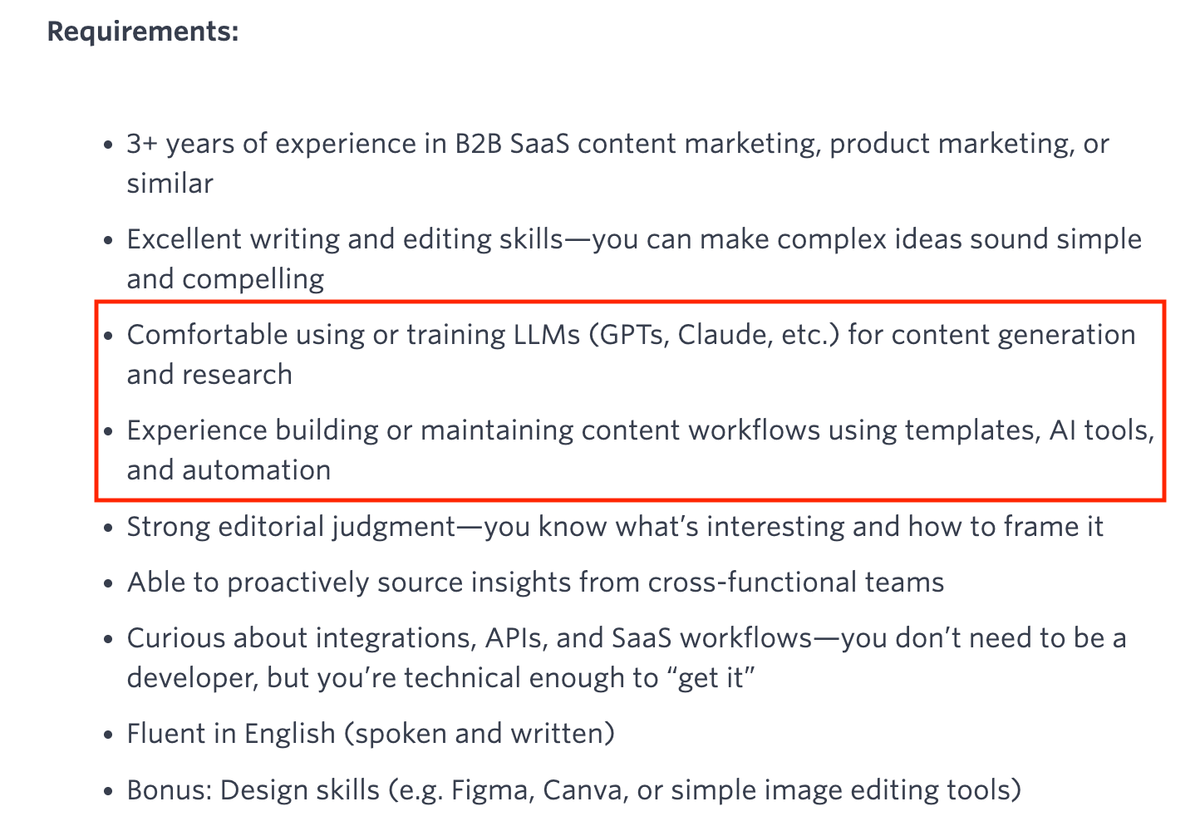
The bottom line: We need to get better at designing and operating efficient content systems powered by today’s technology.
Here’s what it means:
-
Building AI and automation workflows that eliminate bottlenecks
-
Creating templates and structures that enable consistency
-
Designing connections between tools to reduce manual work
-
Setting up measurement systems that track what matters
Let’s see how you can approach it.
Start with an audit: Find where you’re wasting time
Before you dive into AI tools or automation platforms, get clear on what’s slowing you down.
The real bottlenecks often hide in plain sight: disjointed processes, repetitive manual work, and poor communication channels.
1. Audit current team workflows
First, map your content production process from idea to publication.
Break it down by activity: research, writing, editing, formatting, meetings, and administrative tasks like assigning specialists and adding updates to the project management tool.
Then, try to answer these questions:
-
What takes the most time in your content process?
-
Where does work consistently get stuck?
-
Which tasks feel like unnecessary busywork?
-
What information is frequently missing when you start?
These conversations reveal the real operational pain points.
For example, I’ve seen teams spending weeks editing a single article, getting stuck in endless revisions, or spending months manually updating blog posts, only to repeat the process again two months later.
2. Assess current AI + automation use
Next, review the tech you’re already using.
Catalog everything: the official tools and the shadow tech that team members use independently, from AI chatbots like Claude to workflow automation platforms like n8n.
Map how information flows between these systems. The manual handoffs between tools often create the biggest slowdowns.
Answer these questions:
-
Is the content consistently on-brand, or generic in the way AI drafts tend to be?
-
How much human editing does it require?
-
Are you using shared prompt libraries and tools, or is everyone creating their own?
-
Which automation workflows actually get used versus sitting idle?
The reality is that most content teams adopt various AI tools and automations without a clear strategy or integration.
For example, individual team members might use AI chatbots like ChatGPT and manage disconnected Google Docs, a setup that often leads to quality gaps and requires extra manual work.
3. Identify bottlenecks
Finally, pinpoint where your content engine loses momentum.
Find error-prone stages and communication gaps that might indicate missing documentation or unclear processes.
The most stubborn bottlenecks I consistently see include:
-
Scattered feedback across Slack, email, and document comments
-
Lack of content quality and tone of voice guidelines
-
Hours spent reformatting the same content for different channels
-
Content asset chaos (where are those images/logos/previous articles?)
-
Vague briefs that require multiple clarification rounds
-
Content stuck in approval limbo with no clear ownership
-
Manual analytics assembly from multiple platforms
The outcome?
These areas represent the highest-impact opportunities where AI and automation can transform your workflows.
Build the core content process first
Once you’ve identified your content bottlenecks, build a structured workflow that addresses them.
Create a repeatable content engine
Your audit revealed where time gets wasted.
Now, you need to build the infrastructure that eliminates those inefficiencies.
Define focus areas for your content
First, map out your priority content types: product-led blogs, SEO-driven content, sales enablement, partner content, etc.
Your process needs to accommodate all of these, but with appropriate variations for each.
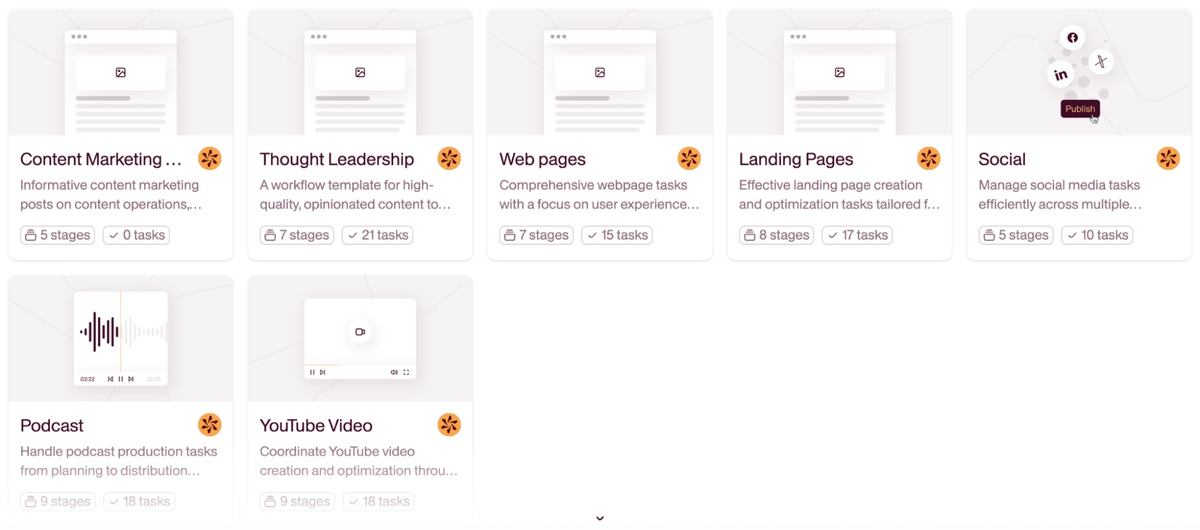
If you’re using Relato, create dedicated workspaces for different content categories.
Standardize formats
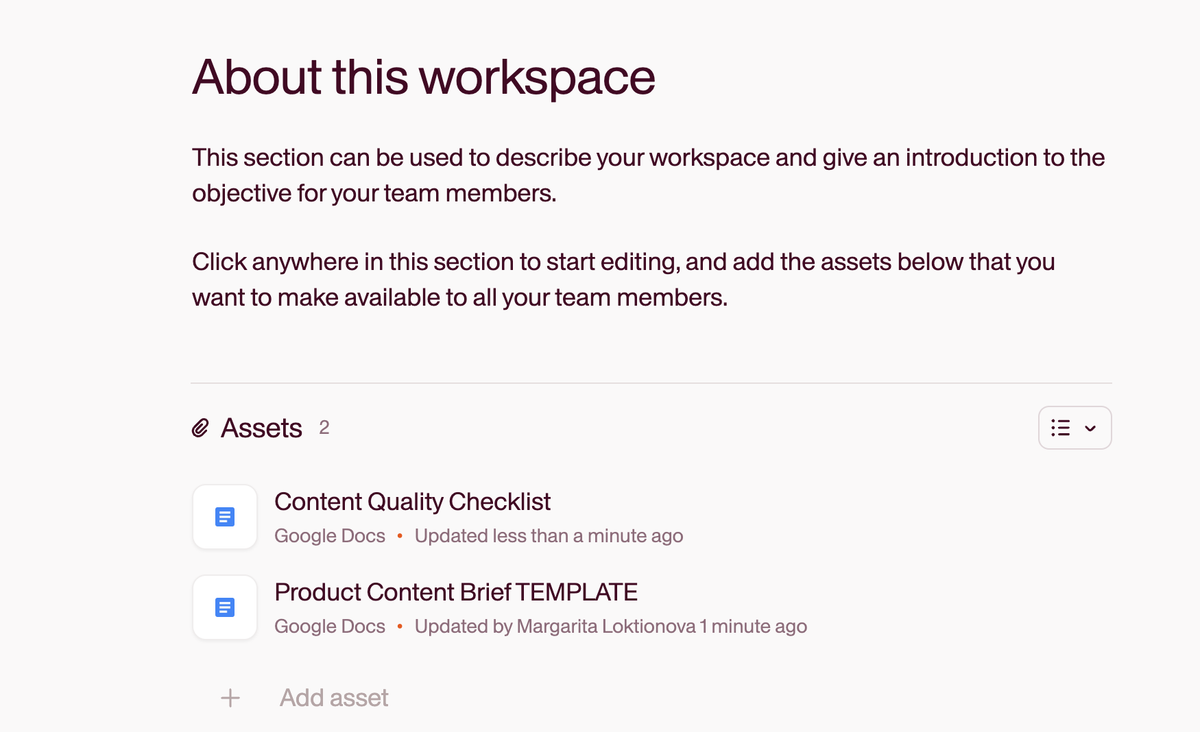
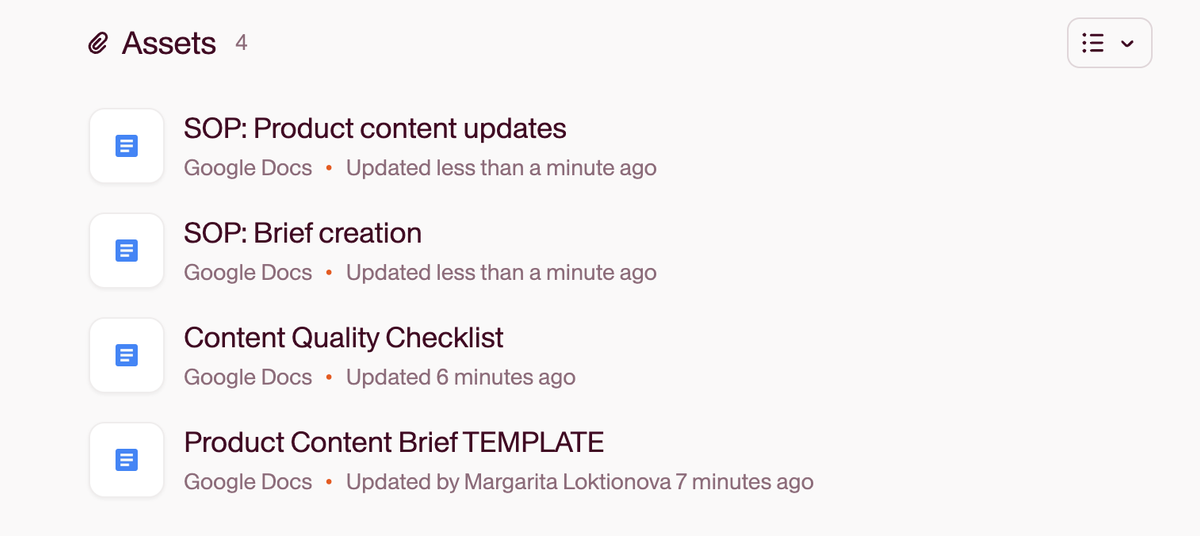
From here, create templates for recurring content assets: brief templates, SME input forms, outline frameworks, and review checklists.
Make sure that these documents are easily accessible and visible to all team members.
In Relato, upload them to each relevant workspace:
Document processes
Next, create standard operating procedures (SOPs) that detail required inputs, quality standards, review criteria, and publishing steps.
For example:
-
Content brief SOP: Who creates briefs, required sections (audience, goal, keywords, CTAs), approval process, and timeline expectations
-
Editorial SOP: Style guide application, fact-checking requirements, brand voice guidelines, and common mistakes to avoid
-
Review cycle SOP: Maximum review rounds, turnaround time expectations, how to provide feedback, and who has final approval authority
-
Publishing SOP: Technical requirements, pre-publish checklist, distribution channels, promotion workflow
You can also store these SOPs directly in Relato’s workspaces:
Assign clear ownership
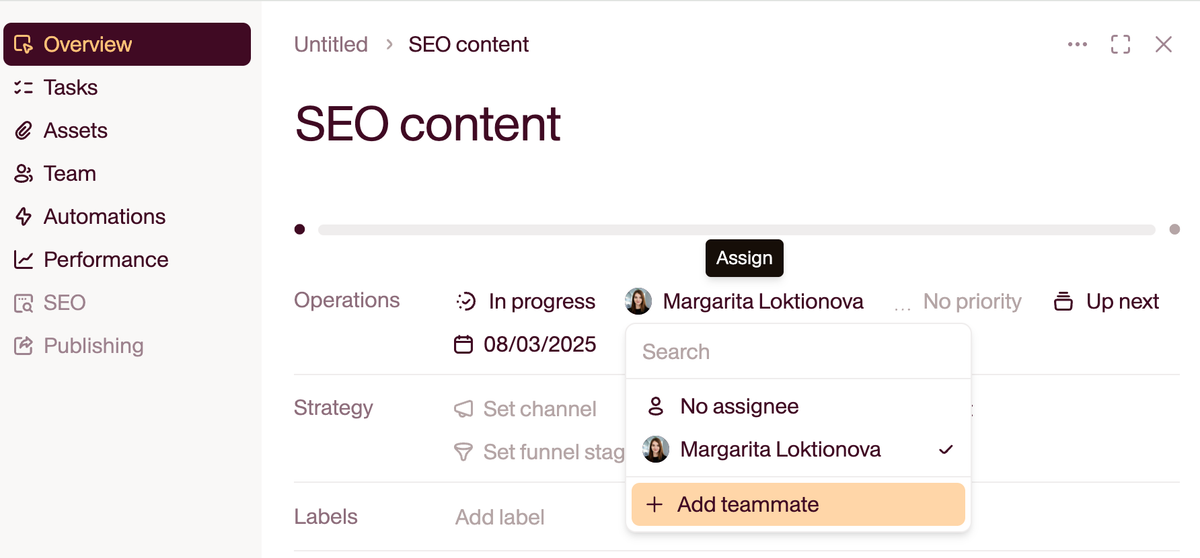
Finally, designate specific owners for each workflow stage.
For example, content strategists and SEO specialists for briefs, writers for drafting, and editors and product marketers for review cycles.
In Relato, use the task management feature to assign these roles and track accountability throughout the process.
Systemize your workflow and start automating
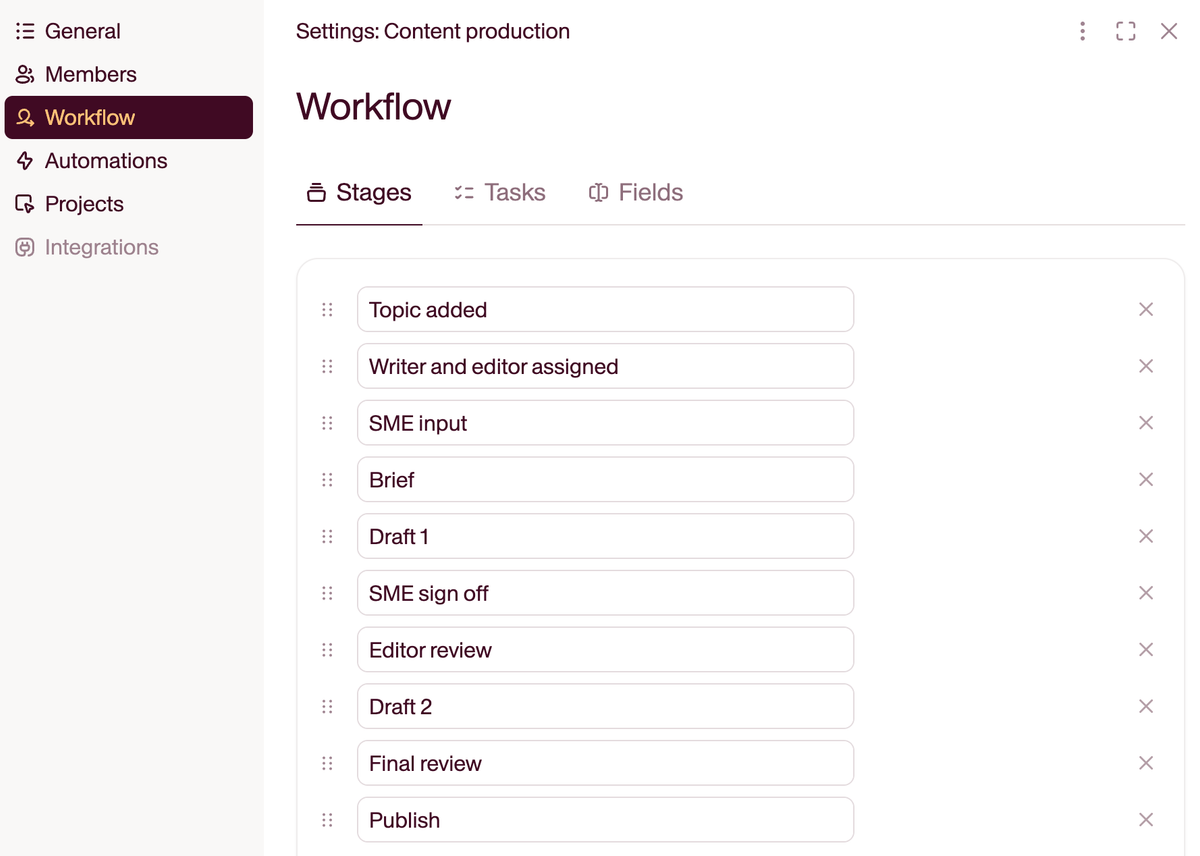
With these core components in place, build a sequential process that moves content efficiently from concept to completion.
For example:
-
Topic planning: Add all topics to your projects for each period (e.g., monthly) with clear deadlines and priority levels.
-
Writer and editor assignment: Designate responsible writers and editors for each topic based on expertise and capacity, or let them pick tasks from a live board.
-
Input intake: Capture strategic goals, audience targeting, and tone requirements through features like Relato’s forms.
-
Brief creation and SME input: Convert intake information into actionable briefs and upload them to each task.
-
Outline approval: Get alignment on structure before full drafting begins.
-
Drafting: Have writers create the initial content with access to all previous inputs (briefs, audience information, etc.) and guidelines.
-
Editor review: Have editors provide feedback directly on the content and notify the writers by changing the status of the task.
-
Final polish: Apply quality control against style guidelines, SEO requirements, and brand standards.
-
Publication and distribution: Move the approved content to publishing platforms and activate distribution.
In Relato, you can map such workflows for each project, with clear stages that everyone can see and follow.
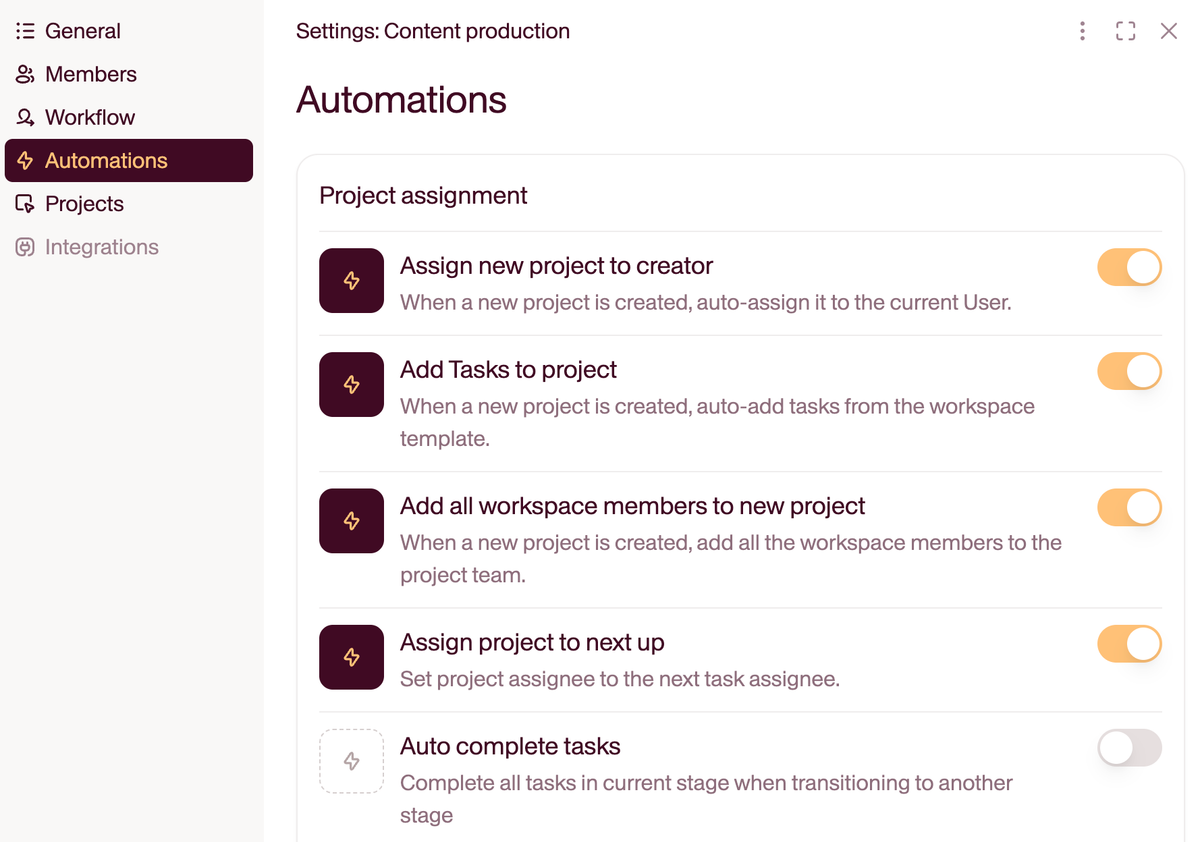
You can then automate repetitive tasks like adding tasks to projects, auto-completing tasks, and adding workspace members.
How to build content systems with AI: the production pipeline at a glance
Once the SOPs are written and ownership is clear, the next move is to translate that pipeline into a configurable system you can run, reuse, and automate. Think of it as five stages, each one doing one job, each one handing the output to the next without a manual translation step in between.
- Intake to brief. A short form captures audience, goal, channel, and primary keyword. An AI agent expands the brief with SERP data, related FAQs, and a draft outline.
- Brief to draft. A writer (or an AI assistant working from the brief) drafts against the approved outline. Voice guidelines and a forbidden-words list travel with the brief, so the output starts on-brand.
- Draft to review. An editor checks accuracy, voice, structure, and SEO. AI side-tools handle the mechanical pass (grammar, schema, readability) so the human spends time on judgment.
- Review to publish. The approved asset moves to the CMS with metadata attached: title tag, meta description, internal links, schema. Nothing gets re-typed.
- Publish to loop. Distribution kicks off, performance is tracked against the original goal, and what you learn rolls into next month’s intake template.
If a stage is doing more than one job, split it. If a handoff requires a person to copy-paste from one tool to another, automate it. That is the difference between a content system and a content checklist. The roles and rituals sitting underneath these five stages are the subject of our guide on how to operationalize your content strategy, which is worth reading first if your operating model is still informal.
Can AI automate a content pipeline from brief to publishing?
Partly. Where you draw the line is the part that decides whether it works.
AI can carry the mechanical stages by itself: expanding an intake form into a brief, generating an outline from SERP data, drafting against that outline, running grammar and readability passes, attaching metadata, and reformatting the finished asset for each channel. It cannot pick the topic, choose the angle, verify a fact, or approve the publish. That first stage assumes an intake form already exists, which is usually the shift from taking content requests to running a content program rather than an automation problem.
The teams I see doing this well automate four of the five stages and keep exactly one human gate, immediately before publish. The teams that struggle either automate nothing past drafting, or remove the gate and spend the next quarter cleaning up. The gate only works if someone specifically owns it, which is why defining content ownership tends to be the prerequisite rather than the follow-up.
Here is where the line actually falls, stage by stage:
| Stage | What AI can own today | What still needs a person | Where the handoff breaks |
|---|---|---|---|
| Intake to brief | Expanding a short form into a full brief, pulling SERP data, related questions, and a draft outline | Choosing the topic and the angle, deciding whether it is worth writing at all | The form captures the deliverable but not the business goal, so the brief is detailed and pointless |
| Brief to draft | A first draft against an approved outline, with voice guidelines and a forbidden-words list travelling with the brief | First-hand experience, original examples, anything the model cannot know | Voice guidance lives in someone’s private chat history rather than in the brief |
| Draft to review | Grammar, readability, schema, keyword coverage, formatting consistency | Accuracy, judgment, whether the argument holds, whether it is worth the reader’s time | Nobody separated the mechanical pass from the editorial one, so the editor does both and becomes the bottleneck |
| Review to publish | Pushing the approved asset to the CMS with title tag, meta description, internal links, and schema attached | The approval itself | Metadata gets re-typed at the CMS, which is where the errors enter |
| Publish to loop | Distribution, channel reformatting, pulling performance against the original goal | Deciding what the numbers mean and what changes next month | Performance is tracked but never routed back into the intake template |
No single tool runs this well end to end, which is the part most buyers discover late. Most teams land on a workspace that owns the pipeline, an AI builder that creates the agents, and a connector for the tools they already pay for. Choose the workspace first. A stack where the AI drafting tool is the system of record works fine for one person and falls over the moment a second one joins.
Every one of those broken handoffs has a cost that never shows up on a tool invoice, which is the argument we made in detail on the hidden costs of content friction.
How to organize content documents by product and by marketing task
This one comes up constantly once a team passes about fifty assets, and the usual answer is wrong.
The instinct is a folder tree. That forces you to decide whether product or marketing task is the top level, and within a month you will want the other one. Filing a launch FAQ under Product A > Launch means you cannot pull every launch asset across products without opening five folders and hoping nothing was misfiled.
Use independent attributes on the asset instead:
- Product, the thing the asset covers.
- Task, the job it does: launch, sales enablement, SEO, lifecycle, partner.
- Stage, where it sits in production.
- Channel, where it ends up.
Then filter on any axis without moving a file. The test is whether someone can pull every enablement asset across all products, and every asset for one product across all tasks, in a single query. If that takes a folder crawl, the filing is the bottleneck rather than the volume.
This matters more than it used to, because AI agents inherit whatever structure you give them. An agent asked to draft launch content for a product can only find the prior art if the prior art is tagged. Teams running several disconnected tools tend to discover this late, which is the pattern we covered in the Frankenstack.
How to add AI to your workflow, the right way
Once your core process is running smoothly, it’s time to integrate AI strategically.
Just don’t expect it to do all the work for you.
Here’s how I see it: AI solves some problems well and others badly, and the whole job is knowing which is which.
Maddy shared, “There’s such a duality to AI on multiple levels. The fact that it can take your job, but it can also make your job more enjoyable. Understanding that it’s great for some things but not for others. It’s ok to feel both ways, just don’t let the negatives keep you from figuring out how to work with it for your use cases.”
The bottom line is: Strong content operations require both human expertise and technological assistance. On the human side, that expertise eventually needs an owner, and knowing which content ops role to hire matters as much as the tooling you pick.
This table from Britney Muller’s “Actionable AI for Marketers” course provides a clear guide for where AI can help and where it falls short:
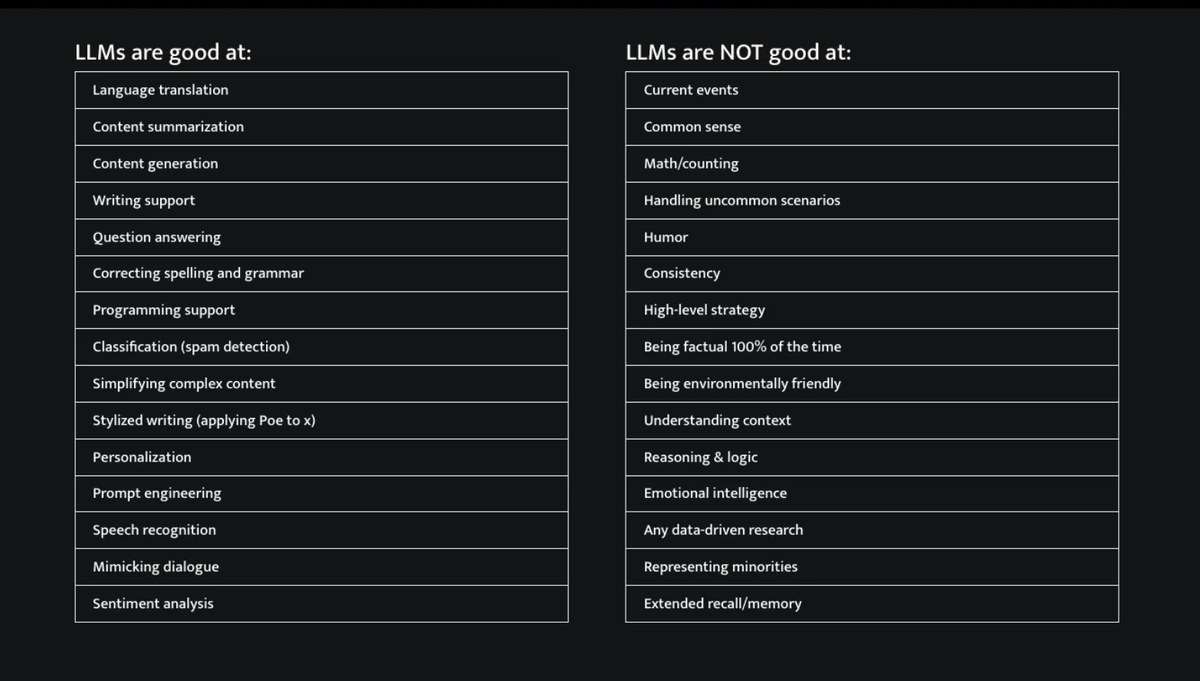
The reality is that AI excels at mechanical tasks like summarization and language processing. But it lacks the contextual awareness and judgment that humans bring. That gap is exactly why a handful of skills keep content marketers indispensable beyond AI, from strategy to first-hand expertise.
Maddy admitted, “One of the biggest mistakes I usually witness is trying to use AI to solve problems it’s not good at. For example, LLMs are not as great at ‘Reasoning & logic’ as some might expect! So take care with outsourcing tasks to AI and ensure that there’s still human oversight/review if you decide to outsource those tasks anyway.”
And I still feel like many of us don’t fully get it: some businesses want to run everything through AI, while others avoid it entirely.
The truth is somewhere in the middle.
What to look for in an AI content operations platform
“Content operations platform” used to mean a project tool plus a Drive folder. In 2026, the bar is higher. An AI content operations platform should give you:
- A single workspace where briefs, drafts, source files, and approvals live together, so the AI has context and so do the humans. (The case for a single source of truth in content marketing is the same case in miniature for AI inputs.)
- Reusable templates and prompts the whole team can call, not a private library locked inside one editor’s account.
- Role-based review, so an AI draft can move forward only after the right human has signed off.
- Permissions and lineage, so every published asset can be traced back to the inputs that shaped it.
- An automation layer that connects intake, drafting, review, and distribution without the team writing scripts.
A good evaluation question: if a writer left tomorrow, would the next person know what to do, with which tool, in what order? If the answer lives only in the writer’s head or their personal ChatGPT history, the platform is not doing its job.
Improve your processes with automation: From briefs to creation and distribution
From here, start designing connected workflows that use AI strategically instead of relying on your team to deploy random, one-off solutions.
Maddy shared, “In my own experience, the first step to AI readiness is accepting that AI is here to stay and not going away. It will become increasingly more integrated with our workflows. Love it or hate it, to stay competitive in today’s marketplace, you need to accept it and learn how to use it to create efficiencies and leverage it in your role.”
Let’s explore the specific content stages where automation creates the biggest impact.
Data workflows
The quickest wins come from automating data movement between systems.
This eliminates manual copying, reduces errors, and saves time.
Maddy shared, “One of the best examples is taking data from one platform and automatically sending it to/translating it for another platform. This is where humans tend to get lazy, and transferring data manually can introduce errors unnecessarily.”
For content teams, such data workflows include:
-
Research to brief automation: Connecting SEO tools directly to your content planning system
-
Analytics to strategy: Automating reporting that pulls metrics into unified dashboards
-
Feedback to ideas: Routing customer feedback with specific tags into your content idea repository
-
Content to distribution channels: Automatically pushing published content to social media, email, and other platforms
Tools like Zapier, Make, or native integrations can connect these systems with minimal technical setup. If you have already hit Zapier’s per-task pricing wall on content workflows, our Zapier alternatives for content teams guide walks through the closest like-for-like replacements.
Research
For the writer-facing side of this (sourcing, fact-checking, audience voice mining), our AI content research guide covers the prompts and verification steps that keep accuracy intact.
Next, you can automate three critical research tasks to make sure you never miss important insights:
-
Competitor monitoring: Track content updates, pricing changes, product launches, and job listings to understand strategic moves.
-
Trend tracking: Monitor industry keywords, identify emerging topics, and track audience engagement patterns across publications.
-
Social listening: Capture brand mentions, track sentiment, and gather customer feedback.
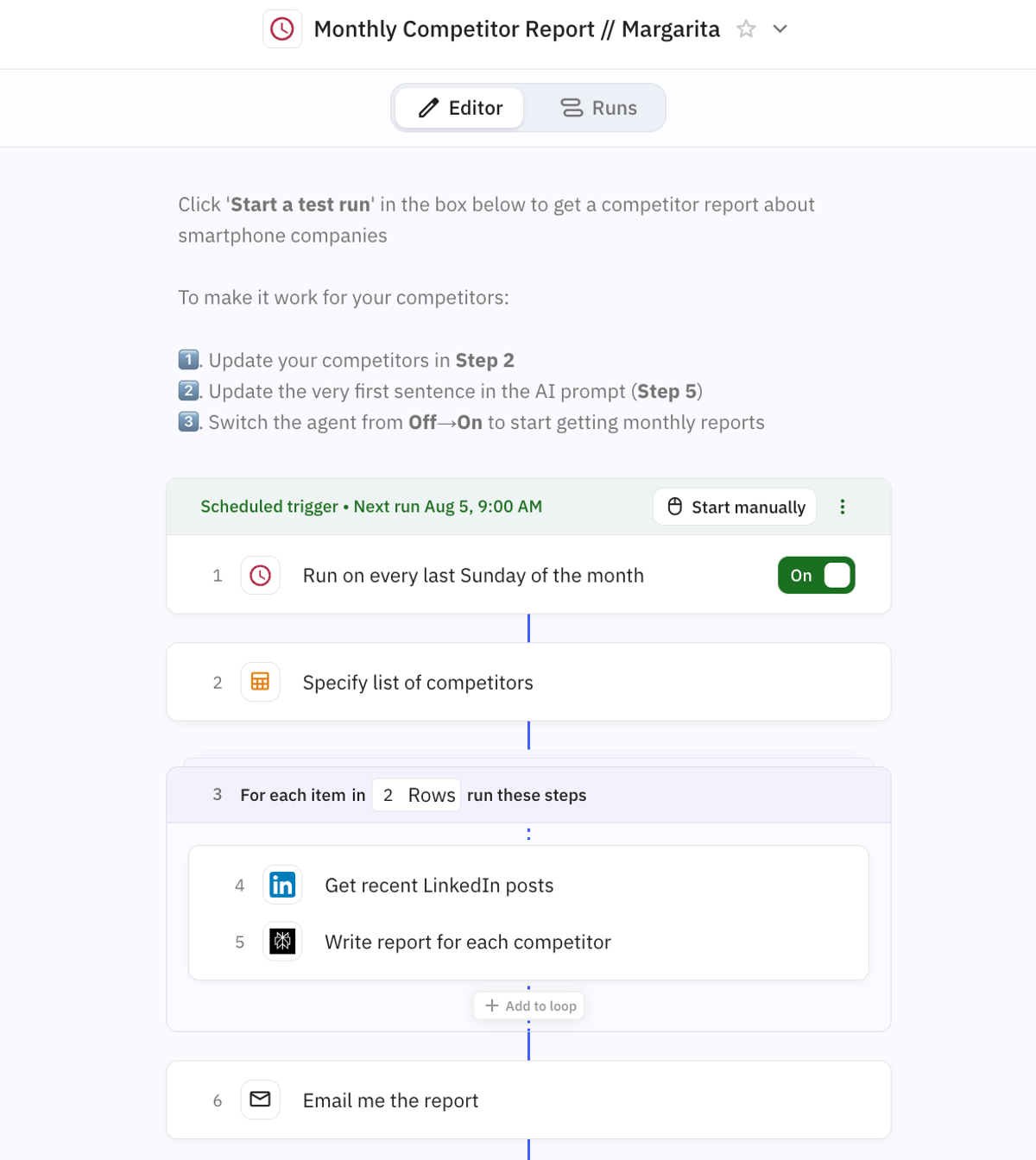
Maddy recommends setting up automated workflows using tools like Browse.AI to monitor competitor content, Octolens to track mentions, or Zapier to set up custom automations.
I built standalone workflows for each of these tasks in Relay.app for a long time, and that option has closed: Relay.app announced its wind-down in July 2026, with free accounts deleted on August 15, 2026 and paid accounts ending on September 14, 2026. If you still have access, export now; if you do not, the guide below covers rebuilding without an export. Our Relay.app migration guide walks through the export, and the Relay.app alternatives breakdown covers where content teams are landing instead. The pattern below is worth keeping whichever builder you move to.
For example, this agent runs on a scheduled trigger and sends competitive analysis updates straight to my inbox:
Ideation
Next, use AI tools to find content ideas faster. Here’s what you can automate:
-
Topic research: Set up tools to find trending questions in your niche and identify content gaps your competitors haven’t covered.
-
Audience listening: Create automated workflows that collect content ideas from customer reviews, support tickets, and social media conversations.
-
Expert insights: Build systems to extract common questions from sales calls, webinars, and SME interviews.
-
Performance patterns: Automatically analyze which existing content performs best to inform future topic selection.
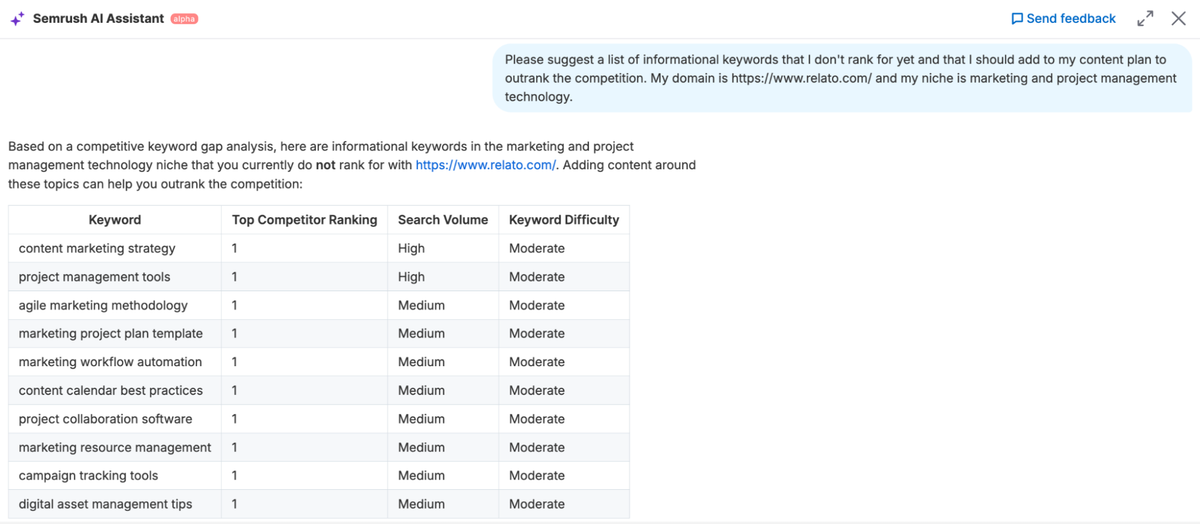
For example, you can use Semrush’s AI Assistant integrated into the main platform to get personalized AI-powered suggestions on what topics to target and where to start.
You can also build custom agents with Zapier, Writer, n8n, or another AI tool to build similar workflows:
Monitoring customer support tickets and automatically adding recurring questions to your content idea board
Extracting topic suggestions from sales call transcripts and routing them to your editorial calendar
Tracking industry news sources and generating reports when relevant trends emerge
Content briefs and outlines
Another great way to use AI is to design content outlines and create briefs. For example:
-
Meeting transcription: Use AI tools to capture client conversations and SME interviews and integrate them into your briefs.
-
SEO-driven structure: Generate data-backed outlines based on what’s already ranking for your target keywords.
-
Brief templates: Create standardized formats that make sure writers get all necessary information every time.
Maddy added, “We use Fireflies.ai in both client and internal meetings — not just to capture ideas, but to record exact quotes we can repurpose for briefs or even as content, whether by sharing transcripts directly or using them as the foundation for a brief.”
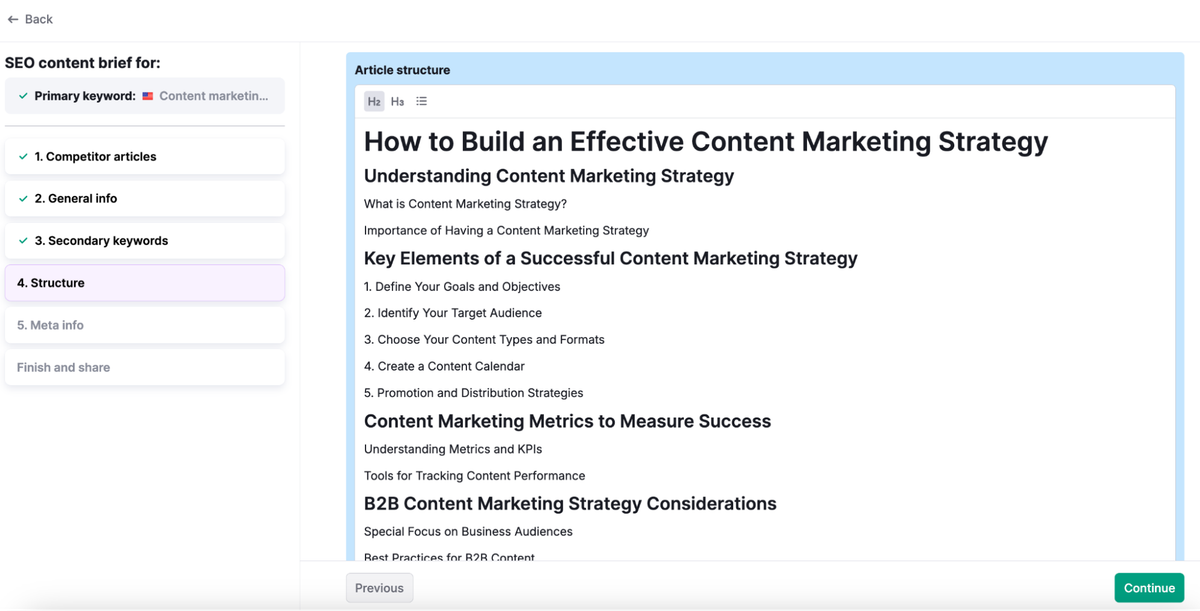
You can also use AI tools like the SEO Brief Generator in Semrush’s Content Toolkit to automate manual, content-level competitive analysis.
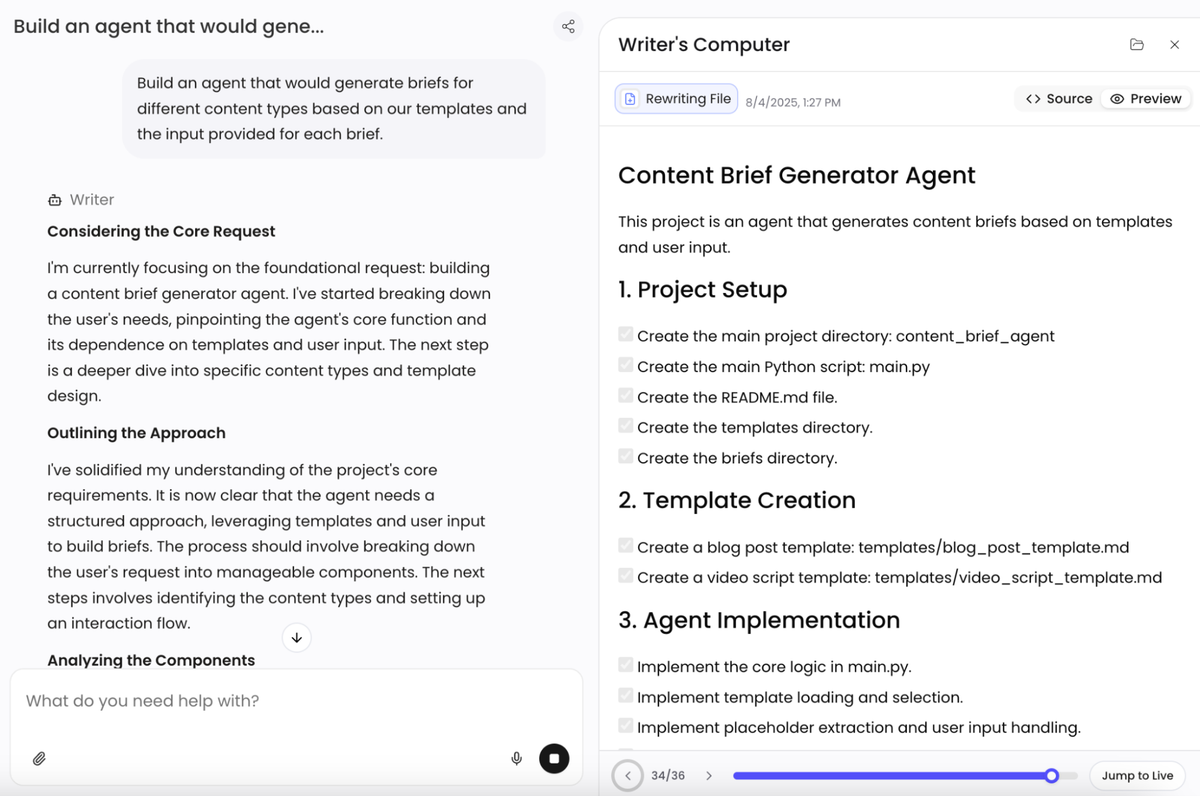
Finally, tools like Writer are great for building custom agents that generate content briefs and outlines in your desired format. For a broader comparison of these AI drafting tools, see our Jasper alternatives guide, which covers Writer, Copy.ai, Writesonic and a dozen others side by side.
Content creation
Next, let AI handle the actual content production workflows, but never without clear direction and human oversight.
Here’s what you can do:
-
First drafts: Generate emails, help center articles, landing pages, etc.
-
Component creation: Build specific sections like intros, conclusions, or technical explanations
-
Content updates: Use AI to update outdated statistics, examples, and dates before they drag down rankings
-
Repurposing: Turn blog posts into social posts, newsletters into video scripts, etc.
-
Personalization: Create tailored content versions for different audience segments
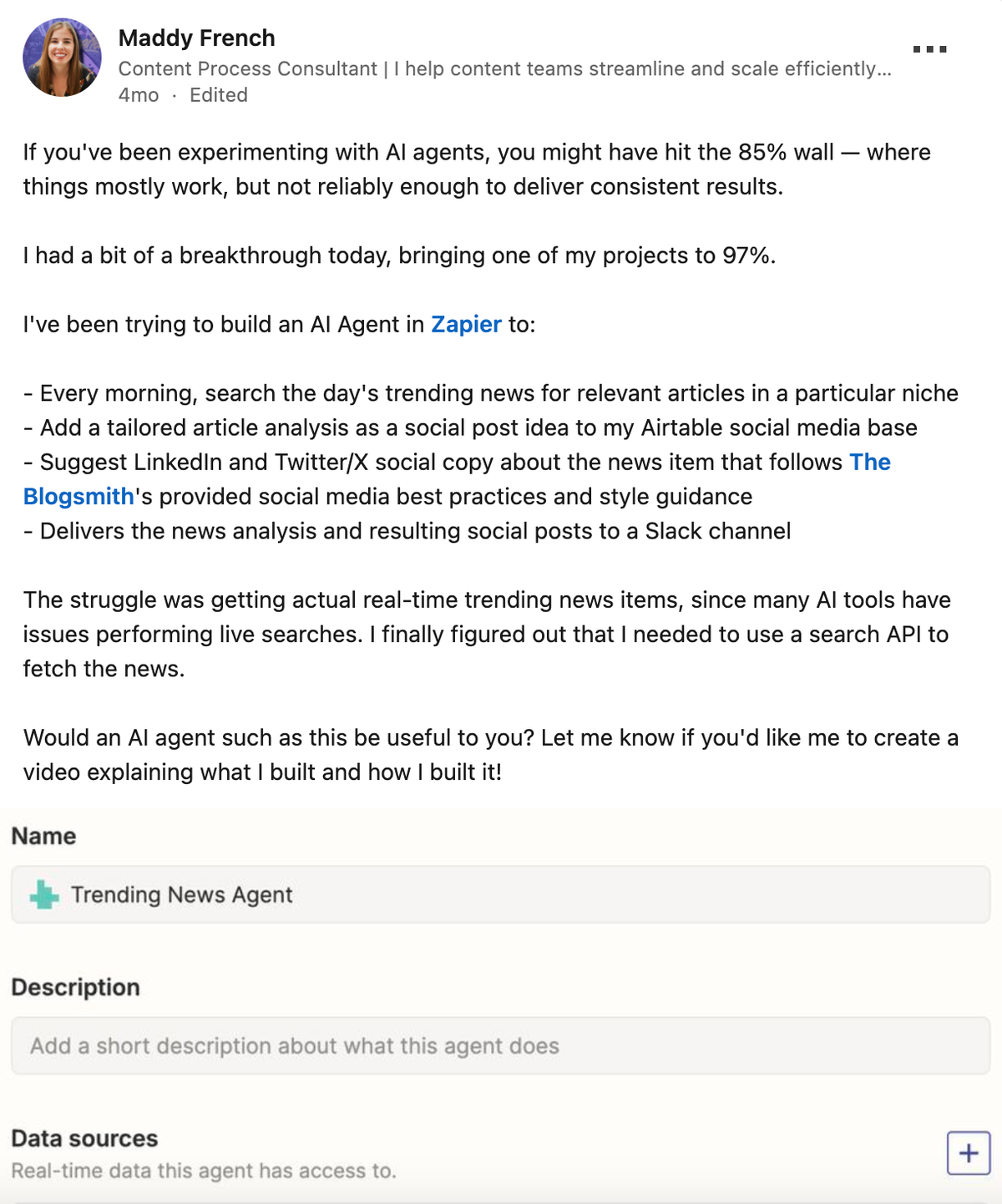
For example, Maddy built a Zapier agent that searches for trending industry news each morning, analyzes relevant articles, and generates brand-compliant social posts delivered straight to her team’s Slack channel.
That being said, when it comes to creating long-form content like thought leadership articles, there are still limits to what AI can do.
And yet, I’ve never worked as fast as I do now.
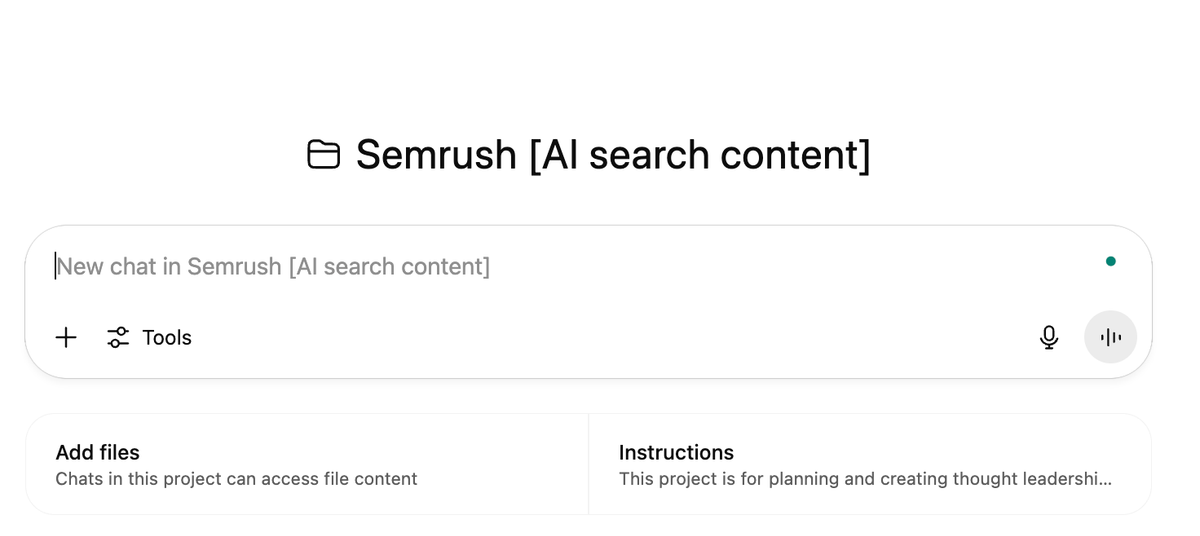
For instance, I’ve set up specialized projects in Claude and ChatGPT for each type of long-form content I work on, each with its own guidelines and best practices.
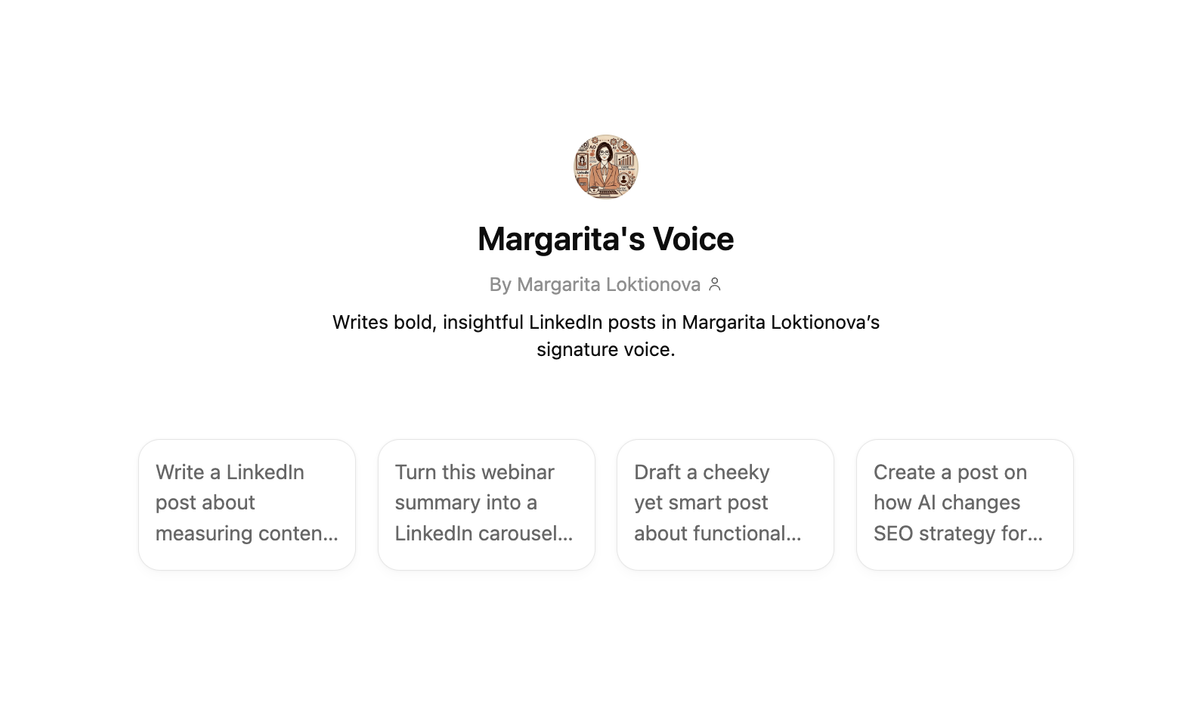
I also build custom GPTs to support various stages of the content production process: from structuring help center articles to transforming blog posts into LinkedIn thought leadership.
Content editing and optimization
You can also automate the editing process to maintain consistent quality while reducing manual review time:
-
Grammar and style checks: Use tools like Grammarly to catch spelling errors and ensure consistent brand voice across writers.
-
Formatting automation: Convert content to match requirements for specific platforms, LLMs, or even voice assistants.
-
SEO optimization: Automatically check content against ranking factors and suggest improvements.
-
Schema generation: Create structured data markup for content to improve search visibility.
Maddy added, “Sometimes the best foundation is a solid, repeatable process. We use project management tools to store our workflows and apply conditional logic to adjust them based on the client, content format, and other variables. For example, our editors follow several specific steps — such as completing a quality control checklist — before we finalize an assignment and deliver it to the client.”
AI platforms like Writer also let you design custom agents for granular tasks, such as generating FAQ sections for long-form content or product pages.

Planning marketing workflows and connecting the dots
Finally, the biggest gains come from connecting these automations into end-to-end workflows rather than running each one in isolation.
These automated systems can be built for any repeatable, routine marketing activity: campaign development, product launches, event promotion, sales enablement, etc.
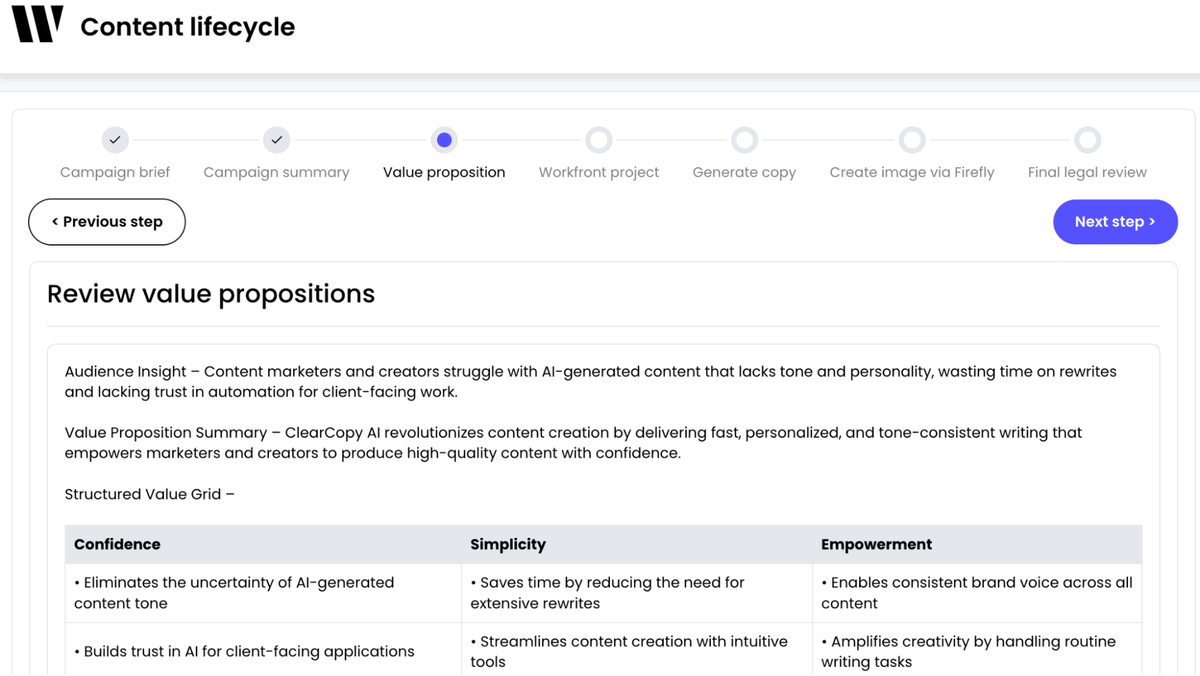
For example, you can use Writer (or a similar tool) to build an agent that takes an initial brief and generates a full-fledged campaign plan with all the assets:
Content workflow automation tools: where each one earns its keep
There is no single tool that does the whole pipeline well. Most teams end up combining a workspace, an AI builder, and a connector. Here is the shape of the stack content teams keep landing on:
| Job in the pipeline | What it actually does | Where teams keep landing |
|---|---|---|
| Workspace and production | Holds briefs, drafts, review, approvals, and SOPs in one place. Owns the workflow. | Relato for content-native ops; general PM tools work for smaller teams with the caveats covered in our Frankenstack guide. |
| Connectors | Shuttles data between SaaS apps without code. Brittle past a few branches. | Zapier, Make, native integrations. See our Zapier alternatives for content teams. |
| AI builders | Build agents and multi-step automations. Good for non-developers. | n8n, Writer, Gumloop. Relay.app wound down in September 2026, so teams are moving off it via our Relay.app alternatives breakdown and the n8n alternative roundup. |
| AI drafting | Long-form generation with voice control. | Jasper, Writer, Claude, ChatGPT. Compared side by side in our Jasper alternatives guide and Copy.ai alternatives roundup. |
| Research and monitoring | Surfaces topics, mentions, competitor moves. | Browse.AI, Octolens, Semrush, plus the best Reddit monitoring tools for community signal, or the F5Bot alternatives roundup if you are replacing a free tracker. |
The trap is choosing the AI tool first and bolting a workflow around it. The cheaper path is to map your five-stage pipeline, write the SOPs, then ask which tools shorten which stage. If a tool does not shorten a stage, it does not belong in the stack.
Final take: Focus on practical results
The AI content hype cycle can be exhausting.
One week it’s “AI will replace all writers!” and the next it’s “Actually, AI content is terrible and everyone can spot it.”
The truth?
AI is just another tool in your stack. The smart move is focusing on where it actually helps, without getting caught in either extreme.
Here’s what consistently works:
-
Start with the workflows, not the tools. Define what you want to create and why first. Then find tech that fits those specific needs.
-
Use content ops tools like Relato to organize production processes, store all docs, and assign clear roles. A central workspace eliminates confusion and speeds up collaboration.
-
Learn by doing and practice. There’s no substitute for hands-on experience with different automation tools and setups. The fastest path to a working system is through experimentation.
-
Always have a balanced mix of AI and human input. Each brings different strengths to the table. Great content needs both.
-
Add feedback loops to refine prompts and logic. What works today might not work tomorrow. Build in time to review and improve your automation regularly.
-
Measure the effectiveness of your content automation effort. Check whether your AI tools actually get used. Even the most powerful automations deliver zero value if your team abandons them after a week.
Bonus: Resources to level up your content automation skills
Maddy and I recommend these learning materials if you want to go deeper:
-
Relato’s content templates: Ready-to-use templates for content planning, production, and measurement
-
The Content Operator newsletter: Weekly insights on smoother workflows and smarter content operations
-
Actionable AI for Marketers: Solid foundation with practical applications
-
Dr. Jules White’s Vanderbilt AI courses on Coursera: Excellent for prompt engineering and AI agents
-
HuggingFace’s courses: For those ready to tackle advanced AI topics
-
N8n’s YouTube tutorials: Step-by-step guides for building AI automations:
-
Morten Rand-Hendriksen’s LinkedIn Learning: Approachable technical AI content
-
Nat Eliason’s Build Your Own Apps with AI course: Practical applications without unnecessary complexity
Frequently asked questions about building content systems with AI
Can AI automate a content pipeline from brief to publishing?
Partly, and the split matters. AI can carry the mechanical stages on its own: expanding an intake form into a brief, generating an outline from SERP data, producing a first draft against that outline, running grammar and readability passes, attaching metadata, and reformatting the asset for each channel. It cannot pick the topic, choose the angle, verify a fact, or approve the publish. Teams that make this work automate four of the five stages and keep one human gate before anything goes live. No single tool does the whole run well, so most stacks pair a content workspace with an AI builder and a connector.
Which AI tools take content from brief to publishing?
There are four categories and you usually need three of them. A content workspace holds briefs, drafts, review threads, and approvals, and owns the workflow itself. An AI builder creates the agents that expand briefs and draft against them. A connector shuttles data between the tools you already pay for. An AI drafting tool handles long-form generation with voice control. Pick the workspace first and let it own the pipeline. A stack where the AI drafting tool is the system of record works for one person and falls apart the moment a second one joins.
How should content teams organize documents by product and by marketing task?
Use two independent attributes on the asset rather than one folder tree. A nested structure forces you to choose whether product or task is the top level, and you will want the other one within a month. Tag each asset with the product it covers and the job it does (launch, enablement, SEO, lifecycle), then filter on either axis. Add stage and channel as separate attributes. The test is whether someone can pull every enablement asset across all products, and every asset for one product across all tasks, without moving a single file.
How do you build a content system from scratch?
Start with the five jobs every content system has to do: intake, production, review, distribution, and measurement. Map your current process against those five and find the stage that breaks first. Build one repeatable workflow for that stage, write the SOP, then automate the parts that do not require human judgment. Repeat for the next bottleneck. Most teams try to redesign all five at once and ship none of them. Pick the noisiest stage and start there.
What is the difference between content ops and AI content operations?
Content ops is the discipline: workflows, templates, roles, and review cycles that keep production consistent. AI content operations is content ops with AI woven into specific stages, such as brief expansion, outline generation, editorial side-tools, and distribution formatting. The discipline is the same. The difference is that the system now has to manage AI inputs and outputs as first-class citizens: prompt libraries, voice guardrails, human review gates, and lineage tracking.
What tools should be in an AI content operations platform?
At minimum: a workspace that holds briefs, drafts, review threads, and approvals together; a prompt and template library the whole team can reuse; an automation layer that connects intake, drafting, review, and distribution; and a measurement view that ties published assets back to the goal they were briefed against. Avoid stacks where the AI tool is the workspace; teams outgrow that setup inside a quarter.
How do AI content pipelines scale long-form SEO without losing quality?
Three guardrails. First, separate the strategic work (topic selection, audience, angle) from the mechanical work (outline, draft, formatting), and keep humans in charge of the strategic side. Second, keep a forbidden-words list and a voice guide that travels with every brief so AI output starts on-brand. Third, require human review on anything that hits the live site, even if the review is fast. The teams that scale long-form with AI are not the ones with the best prompts. They are the ones with the tightest review loop.
How do you measure whether your content system is working?
Three signals. Cycle time from brief to publish, trending down. Published-to-rejected ratio, trending up. Cost per asset (humans plus tools) per piece of measurable business outcome, trending down. If all three move in the right direction for two quarters, the system is real. If only cycle time moves, you have built a fast pipeline that ships work nobody reads.