From Blueprint to Build: How to Operationalize Your Content Strategy
Turn strategy into shipped content. Learn how top teams bridge the gap between planning and execution with better briefs, workflows, and collaboration.



You had a solid strategy. The kickoff call went well.
Messaging? Aligned. Content pillars? Approved. Even sales was on board.
Now it’s launch week… and everything’s stalled.
The blog’s stuck in review. The case study brief was never written. And someone just asked if the webinar slides are on brand, which is a sure sign they never saw the brand guidelines you shared weeks ago.
Sound familiar?
Chelsea Castle, who led content and brand at CRM platform Close and now runs her own content and brand consultancy, sees this pattern across teams:
“Every single team I’ve ever joined is always reactive. When I talk to friends at other companies, their content teams don’t have their own strategies either. They’re just creating whatever everyone else in the organization says they should create.”
That reactive habit is the trap. It keeps content stuck in service mode, and breaking out of it means treating content as a program, not a service.
Here’s what’s happening: teams nail the what but struggle with the how. They can outline quarterly themes, but they struggle to turn them into actionable briefs, clear timelines, and content that ships on schedule.
To see how high-performing teams close this gap, we spoke with Chelsea and other content leaders who’ve figured out how to grow content production without sacrificing quality or burning out their teams. The titles below are the ones they held when we interviewed them, with a note where they have moved since:
Sam Balter, Head of Content at video marketing platform Wistia
Kasey Steinbrinck, then Senior Content Marketing Manager at communications platform Sinch, now Head of Content at Blue Ivory Creative
Jennifer Clark, then Content Marketing Lead at Zoom, now Senior Manager of Enterprise Content Marketing at Coursera
Janine Anderson, then Content Operations Manager at Zapier, now Senior Web Marketing Manager there
Short version: operationalizing a strategy means turning it into three artifacts that sit next to the work. A brief template that names the audience and the campaign goal. A workflow template that puts an owner and a due date on every step from outline to publish. And one calendar every team that touches the content can see.
This piece won’t ask you to rethink your whole approach. If the strategy itself still feels sprawling, it is worth streamlining it down to a few clear decisions first. From there, we’ll focus on building the system that gets your existing strategy out the door.
Why strategy fails without operations
Strategy without execution is just an expensive PowerPoint. If there’s no process to move content from idea to publish, your plan stays theoretical.
You’re not alone. Nearly 43% of content marketers cite lack of strategy as a core non-content creation challenge according to The State of (Dis)Content, a survey of 545 content marketers by The Content Studio. The detailed figures sit behind the report’s own download, so treat them as that survey’s population rather than an industry census. Even teams with clear goals often lack the systems to turn those goals into action.
Here’s where teams typically break down.
The brief doesn’t reflect the strategy
Your content strategy might target enterprise buyers with thought leadership, but your brief says, “800-word blog post about our new feature.”
Without a clear link between high-level goals and individual assignments, writers end up guessing whether they’re supposed to drive leads, awareness, or credibility. They might hit the word count but misalign on tone, audience, or intent. The fix upstream is a strategy document a writer can actually read, which is what the nine-step B2B content strategy framework is for.
You see the results in surface-level case studies, whitepapers that sidestep real customer pain points, and social posts that feel off-brand. When briefs aren’t grounded in strategy, content meets requirements but fails to influence pipeline, shape buyer perception, or support revenue goals.
At Relato, every brief includes a clear purpose section that connects the individual piece to broader campaign goals, so writers understand exactly what they’re trying to accomplish.
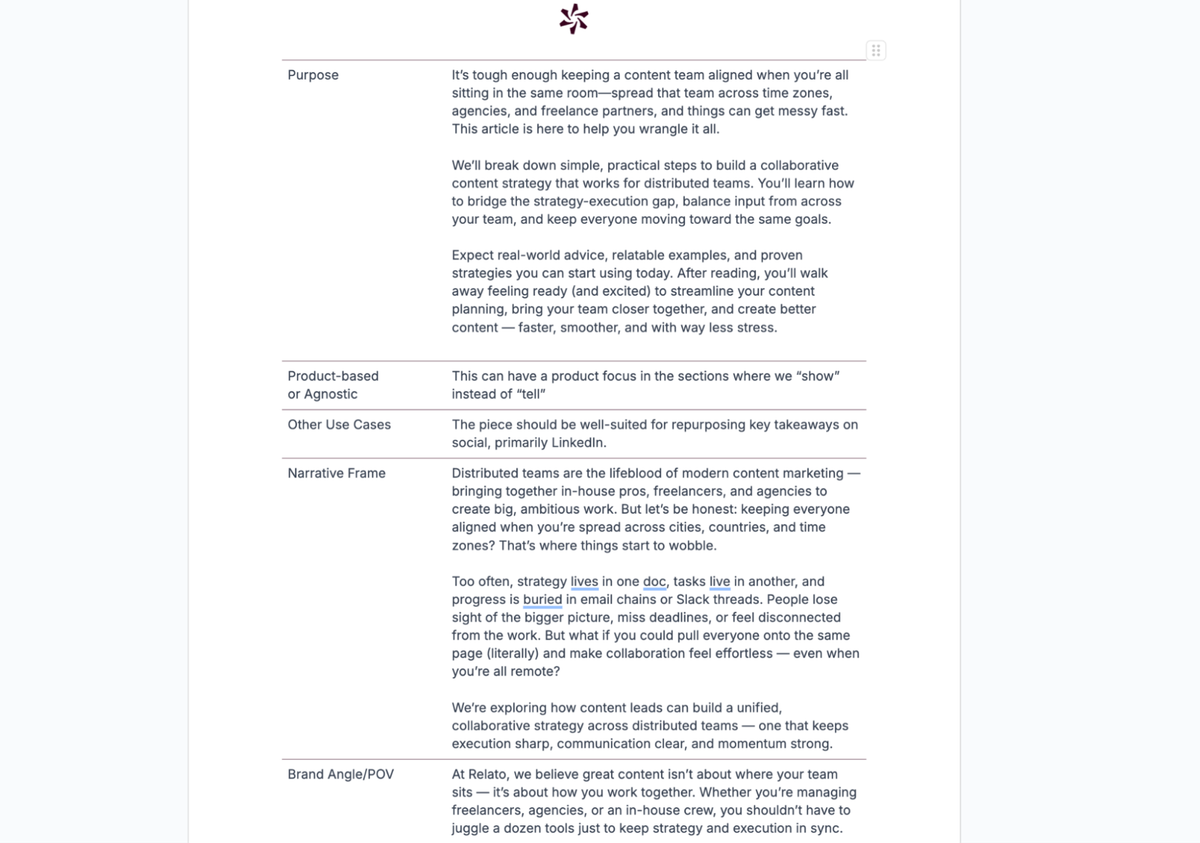
Tip: Check out our content brief template to see how we structure this connection between strategy and execution.
The content calendar is missing deadlines or owners
A calendar with topics but no assigned owners or firm deadlines isn’t a plan. It’s a wish list. And when deadlines shift without updates to reviews or dependencies, momentum stalls and confusion spreads.
Sam Balter, Head of Content at Wistia, sees this happen when process overtakes purpose: “I look to see when our process is sucking the fun out of everything. When a project becomes more about how it will be documented vs. what we are actually trying to say, I know the process needs to be trimmed down.”
Clear ownership and realistic timelines free up your team to create by eliminating the hidden costs of content friction that slow down production. When your content team’s roles and responsibilities are defined upfront, you spend less time chasing updates and more time on work that ships.
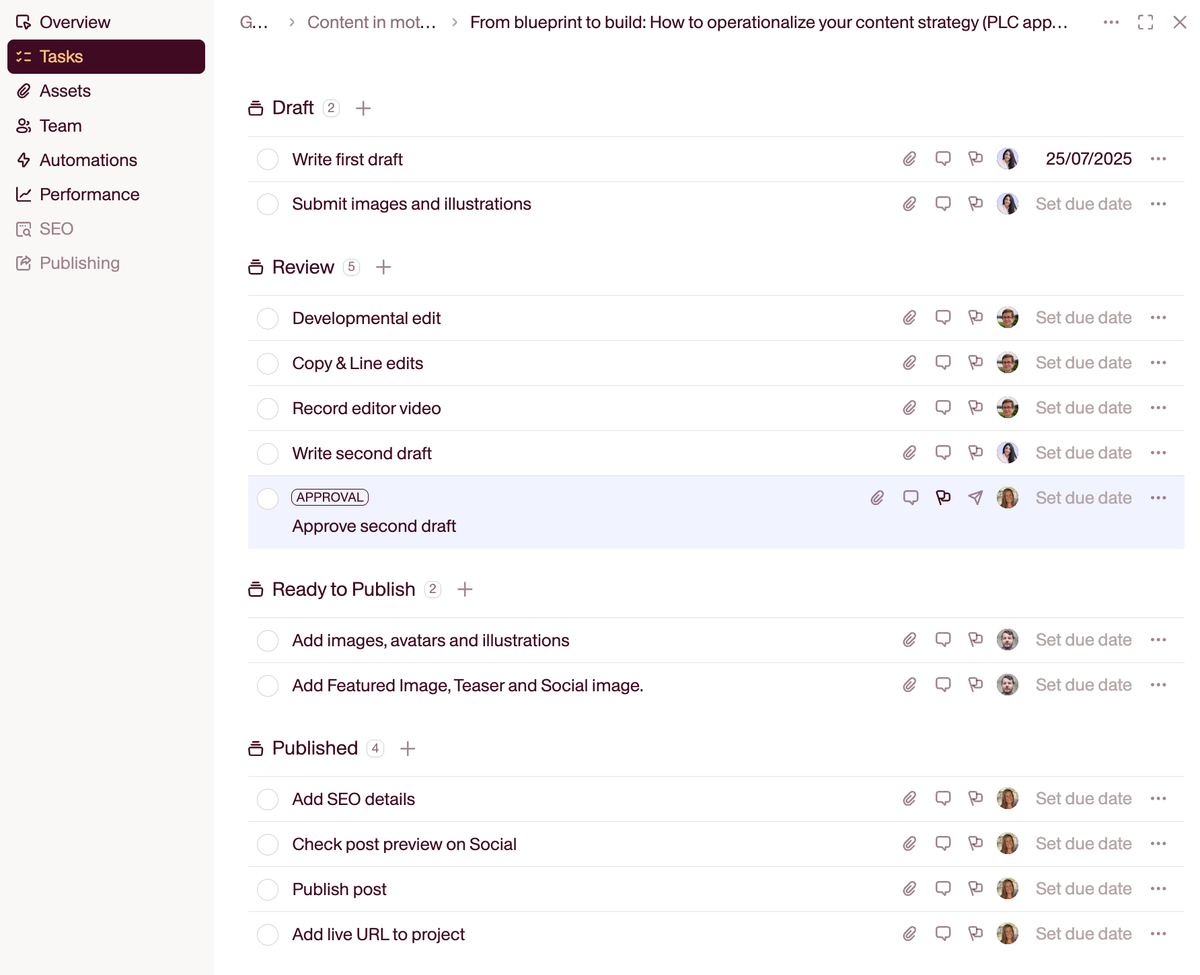
Relato’s task workflows show exactly who’s responsible for each step, from first draft to final publication, with clear deadlines and workflow stages that keep everyone aligned.
Feedback arrives too late, or all at once
Nothing derails a content timeline like late or conflicting feedback. It triggers a chain reaction of rushed edits, missed handoffs, and slipped launch dates, leaving the team stuck in reactive mode instead of executing smoothly.
The fix is early alignment. Build review checkpoints into the workflow at strategic moments: after the outline, after the first draft, and before publication. Clarify who reviews what and when, and define the decisions each stakeholder owns.
Use a responsibility assignment (RACI) matrix to map who’s responsible for creation, accountable for approval, consulted for expertise, and informed of progress.

This prevents the all-too-common scenario where either no one reviews or everyone thinks they have veto power.
Everyone’s working, just not on the same thing
Teams can stay busy without being productive when everyone’s pulled in different directions. Leadership wants more content with fewer resources, AI mandates push for higher volume, and urgent requests scatter your team across disconnected projects.
Chelsea Castle saw this disconnect constantly while leading content and brand at Close:
“I still see a lot of teams getting hung up in the hamster wheel. With AI, there’s a lot of pressure and education needed when we think that we can just use AI to spin up more content. We were already creating a race to the bottom with content quality, and now with AI in the mix, it feels like we are diminishing all of the progress we made in helping people understand how to write for humans.”
The problem isn’t working on different content types, which is necessary. The issue is when there’s no strategic framework connecting these efforts, so you end up with content that checks boxes but doesn’t build toward meaningful goals.
This is where operations become strategy. A system that connects individual content pieces to broader campaigns ensures everyone’s work builds toward the same goals.
What breaks when content, data, audiences, and campaign workflows live in separate systems
Most teams do not have one system. They have a strategy deck in Slides, briefs in Docs, the calendar in a spreadsheet, tasks in a project tracker, drafts in the CMS, performance data in GA4 and Search Console, and audience segments in the marketing automation platform. Every one of those choices was defensible on its own. The damage shows up in the seams between them.
Four things break, in a fairly predictable order.
Context stops travelling with the work. The brief says “IT decision makers evaluating a security upgrade.” By the time the piece reaches design and then the email team, it is a title and a due date. The audience decision was made once and lost twice.
Status becomes a question instead of a fact. When creation, approval, and publishing each live in a different tool, nobody can answer “is this shipping Thursday?” without asking three people. That is the tax that produces the standing status meeting.
Reporting cannot be tied back to intent. Performance data comes back per URL. The campaign goal is in the deck, the audience in the automation platform, the pillar in the spreadsheet. Joining them is manual work someone does once a quarter and then quietly stops doing.
The same decision gets made again and again. Nobody can find the previous version, so positioning, naming, and audience definitions get re-litigated per piece. This is the Frankenstack problem in miniature: the stack grew one rational tool at a time.
The fix is smaller than a re-platform. Decide which four artifacts have to share a home: the brief, the calendar, the asset library, and the performance view. When those reference the same campaign record, the seams stop leaking. Teams that manage it are usually the ones already pulling their data layers into one decision loop instead of reading each dashboard on its own.
Go from themes to timelines
Big ideas need small steps. Without clear themes, formats, and timelines, your team won’t know what to create, or when. Break big goals into campaign-level themes, then map them to specific content types, owners, and deadlines.
Start with campaign themes or quarterly goals
Start with your quarterly goal, then work backward. If you’re trying to drive adoption for a new product feature, for example, map that to campaign themes, formats, and deadlines.
And be realistic about your team’s capacity. Most content teams are just one to five people, yet they’re managing an average of five content formats at once. That kind of scope makes it easy to overpromise and under-deliver, especially without a workflow that assigns timelines, owners, and review layers.
A strategy that doesn’t account for bandwidth will always break in execution. Build from what’s feasible, then layer in stretch content if time allows.
Once the big-picture goal is clear, break it down:
What questions is this audience asking?
What formats are most useful to them?
Where do they prefer to consume content?
This is where Sam offers a smart operational tactic: “Our content strategy is simple. We write content that answers questions our customers have that our product helps solve.”
To put that into action, his team uses a Core Questions Doc, a spreadsheet that maps user questions to articles and flags which ones need updating or review.
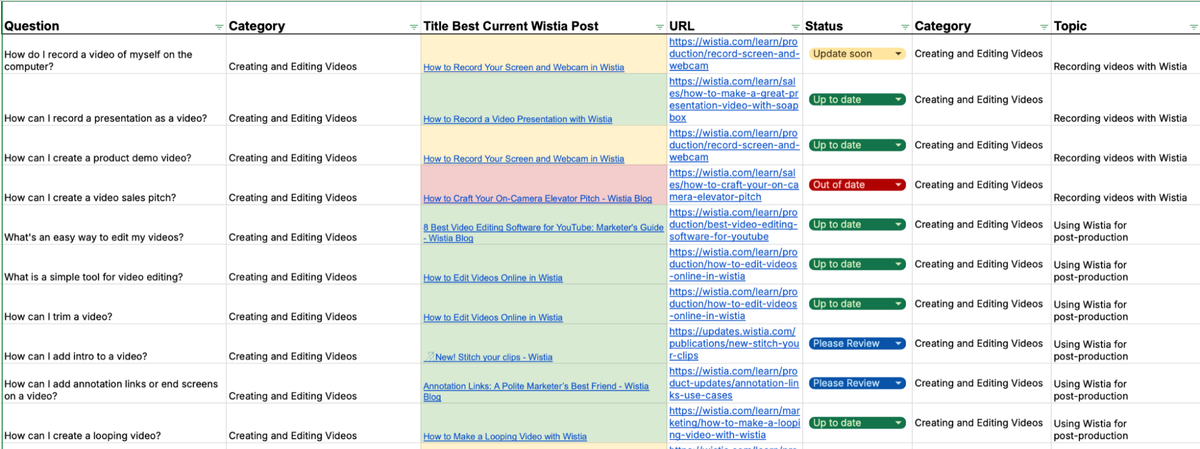
It keeps their library relevant, organized, and tightly connected to customer needs.
Steal this approach: map content ideas to real customer questions aligned with your goals. Then prioritize based on gaps, freshness, and strategic relevance. That prioritization step is also your best guard against falling in love with your own content ideas, since every candidate has to earn its place against the same criteria rather than the loudest opinion in the room.
Identify content types and channels
Once your campaign theme is set, the next step is figuring out how to deliver it across formats, layers of depth, and the channels where your audience pays attention.
Chelsea organizes her strategy around consistency and visibility: “I organize my content strategy into a few buckets: what is your baseline, your baseline content output, your baseline brand building. So you can show up where your audience hangs out, reinforce your point of view, and increase your touch points.”
For example, if your campaign theme is email authentication expertise, your baseline might include weekly LinkedIn posts about deliverability tips, monthly blog posts about authentication best practices, and quarterly webinars with email experts. This baseline layer gives you rhythm. From there, you can build depth.
“Instead of creating something generic for all three audiences - break it into specific pieces for each group,” Kasey explains. Here’s how he breaks complex topics into three tiers to match audience needs:
Basic information (definitions, explainers, how-to content), for general marketing audiences who need to sound informed in meetings
Expert insights (more specific, actionable advice), for email teams who manage authentication but don’t need technical implementation details
Thought leadership (a unique POV or info no one else can provide), for IT professionals who set up DNS records and configure protocols
Map your campaign theme to these layers, then assign formats: basic explainers become blog posts, expert insights become gated guides, and thought leadership becomes webinars or speaking opportunities.
This structure keeps your campaign cohesive without bottlenecking your team.
Map themes to timelines without the spreadsheet chaos.
Relato turns your campaign goals into structured briefs, owners, and deadlines your team can actually follow.
Build structure before assigning tasks
Before work begins, lock in the structure:
What is this piece for?
Who owns it?
When is it due?
A clear brief, owner, and timeline prevent mid-project confusion.
Without that structure, teams risk misalignment, trying to speak to multiple audiences in a single piece or drifting away from the original objective.
Jennifer Clark, then Content Marketing Lead at Zoom, saw this firsthand when audience focus got muddled:
“We sometimes run into pushback from internal teams who worry we’re limiting ourselves by not highlighting our enterprise features in SMB campaigns. But we remind them: if we speak clearly to the right audience, the rest will find what they need through other channels.”
It’s a great example of how upfront clarity on audience, messaging, and purpose keeps content sharp and focused. Which helps avoid strategic drift later on.
Build briefs that guide, not confuse
A strong brief connects strategy to execution without limiting creativity. It clarifies who you’re speaking to, what to say, and why it matters, so everyone stays aligned. Here’s what to include, with previews from how we include these elements in our briefs.
Check out our content brief template here.
Clear objective tied to campaign
Every content piece should directly support a broader campaign goal. If your theme is email deliverability expertise, clarify whether this asset is meant to generate leads, nurture existing prospects, or reinforce your authority in the space.
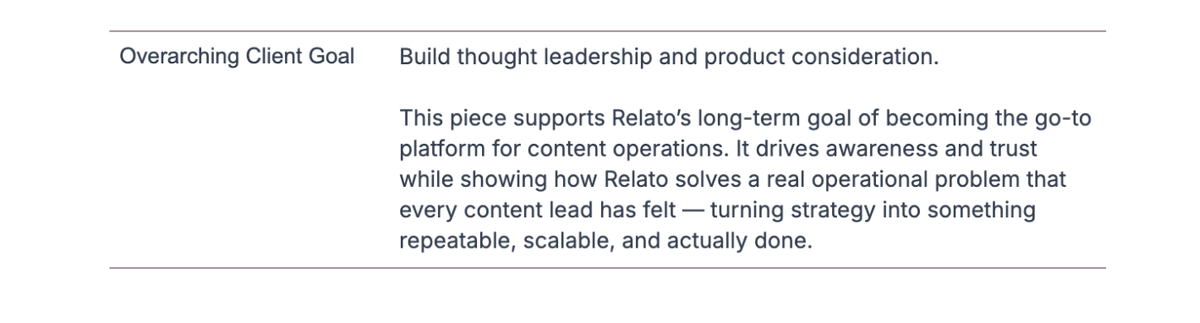
Jennifer underscores the importance of starting with audience clarity:
“Content should always begin by knowing your audience and their challenges. So if we’re targeting ITDMs, we work to understand that audience’s needs and create campaigns and content that speak to them.”
When writers know the goal and audience, they can clearly link your product’s features to the problems it solves.
Target audience and stage
Instead of writing for “marketing professionals,” define your target like this: “email marketing managers at B2B SaaS companies struggling with deliverability for the first time.”
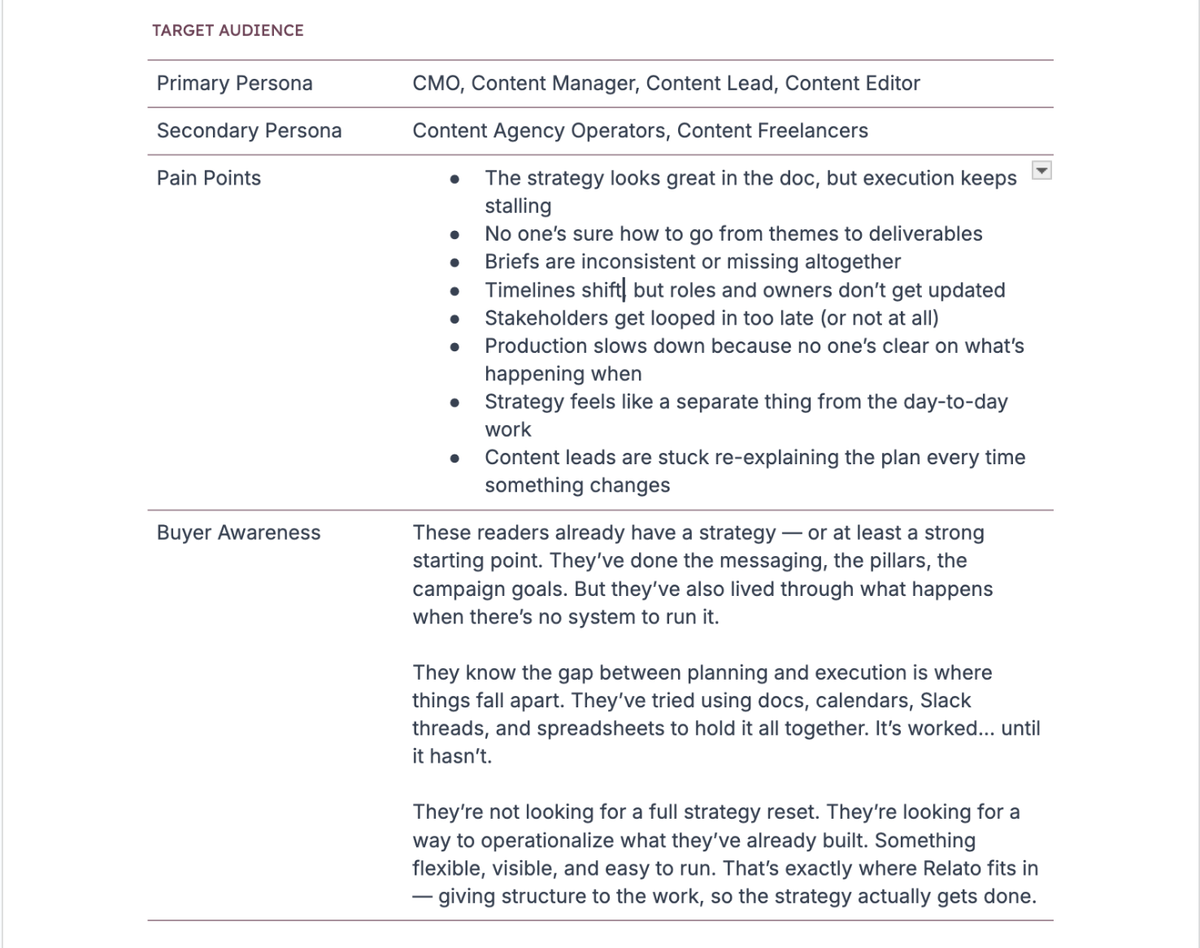
Kasey highlights why this clarity matters, especially when collaborating with subject matter experts:
“Make sure the experts you work with understand the intended audience as well as you do. Are you explaining a complex topic to newbies, or are you writing thought leadership content that their industry peers will consume? There’s a big difference.”
When everyone’s aligned on who the content is for (and what stage of awareness or decision-making they’re in), the insights, tone, and depth all get sharper.
Format, voice, and key points
Spell out the essentials: is this a blog post or a whitepaper? Should it sound like a casual conversation or read like a technical guide? What are the three core takeaways the reader should walk away with?
These elements matter more than you think: 60% of content marketers aren’t confident their content is recognizable by voice and tone alone.
Create clear briefs that define voice, audience, and purpose.
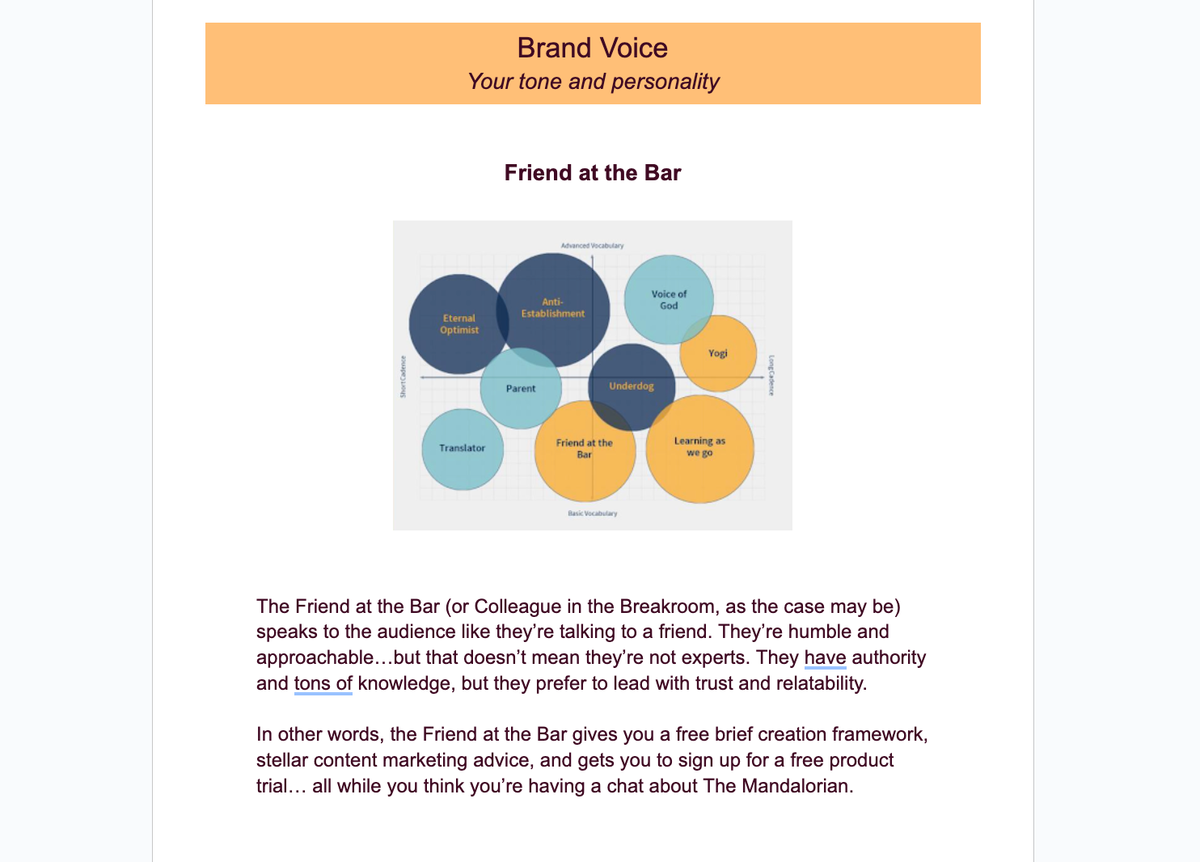
These guidelines help your content sound like you. And when your content speaks with a distinct voice, it becomes instantly recognizable and memorable.
These details keep writers aligned, reducing guesswork, rewrites, and edit rounds.
Links to past work or SME input
Give writers context they can act on. Link to past content that nailed tone or structure, customer interviews, or SME notes. These references help writers echo your brand voice, highlight key product benefits, and reduce revision rounds. Getting those notes in the first place is its own process, and our guide to collecting content from SMEs without booking a meeting covers where to mine the material your experts have already produced. Well-organized SME notes also become the raw material for turning one expert interview into several assets.
Kasey emphasizes the value of capturing SME input early:
“Keep a record of those calls, emails, and Slack/Teams conversations for review. They help you capture the expert’s voice. They’ll lead to good ideas when you take another look. And you can reuse and repurpose those insights in other projects and marketing channels.”
Create a single source of truth for all your reference materials in Relato. House past content, SME transcripts, and interview notes directly in the app, organize them by collections, and connect them to specific briefs.
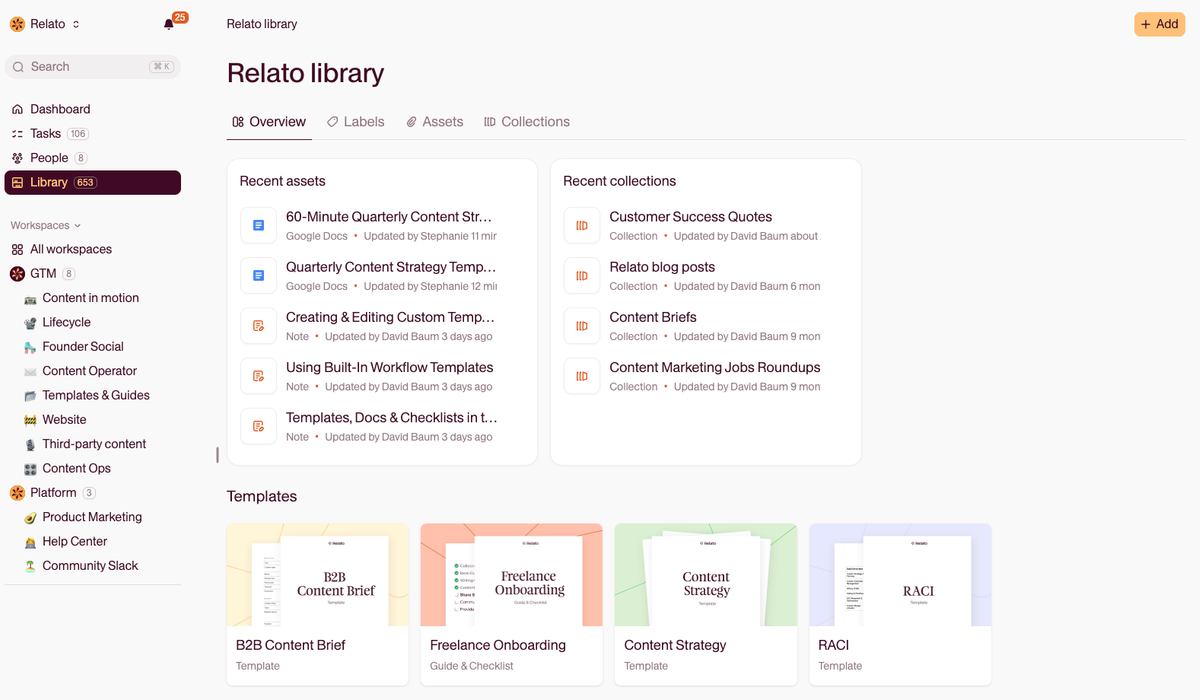
This way, your content producers always have the context they need, right where they’re working.
What gets lost between the brief and the build
A detailed brief is not the same as a brief that survives execution. The complaint we hear most is oddly specific: the brief is thorough, everyone reads it, and then each channel team goes back to its own tools and the work drifts anyway.
The drift happens at the handoff, after the writing is already good. Three things tend to fall through.
First, the reasoning. Briefs record what to do and rarely why, so the social team sees “lead with the integration angle” with no trace of the customer interview that produced it. When the deadline squeezes, the angle is the first thing to go.
Second, the constraints nobody wrote down. Legal wording that cannot change, a product name that is not public for another three weeks, a competitor comparison sales asked us to avoid. These live in Slack threads and get rediscovered in review, which is the most expensive place to find them.
Third, the definition of done. The brief names a metric. The channel tools do not, so each team applies its own bar: the blog ships against organic traffic, the email team against opens, and nobody notices the piece hit neither of the goals in the brief.
So stop treating the brief as a document that gets sent and start treating it as a record that stays open. Link it to every downstream asset instead of pasting excerpts into each tool. Keep the why next to the what. Put the acceptance criteria in the brief itself, so a channel team that never opens the strategy deck still knows what the piece has to do.
That is where a shared workspace earns its keep over a folder of documents: when the brief, the drafts, the review, and the calendar entry are one record, there is no boundary for context to fall through. If your handoffs stall more across time zones than across teams, the async rituals in our guide to aligning distributed content teams are the companion fix.
Assign ownership and define roles early
Clear content ownership prevents delays. When everyone knows their role and deadline, content moves through review without getting stuck. Once the program outgrows a shared spreadsheet, that ownership often belongs to a head of content operations who owns the process end to end.
Who’s writing, reviewing, approving, and publishing?
Instead of assigning broad ownership like “marketing handles the blog post,” specify exactly who does what:
The freelancer writes the draft
The content strategist approves the structure
The product manager reviews for accuracy
The social media manager publishes and promotes
At Zoom, this kind of role clarity was baked into how the team managed content across multiple product lines like Zoom Meetings, Phone, Events, and Webinars.
Jennifer explained:
“We work in a pod model where we assign content strategists and writers to pods based on personas and products.
This allows us to focus on each product almost as its own business unit. We coordinate campaigns in these pods with product marketing, integrated marketing, digital, and social media to plan and promote the assets each quarter.”
The pod structure reduces overlap across product lines, keeps messaging consistent, and ensures every campaign has a focused, cross-functional team driving it from start to finish.
What’s the timeline, and where does it live?
A single due date isn’t enough. You need a timeline that maps every step (drafts, reviews, approvals) with buffer time for edits and constructive feedback.
Relato removes the guesswork with pre-built workflows designed for content teams. Each workflow comes with tailored steps, tasks, and approvals based on the type of asset, so you’re not reinventing the process for every blog post, case study, or campaign.
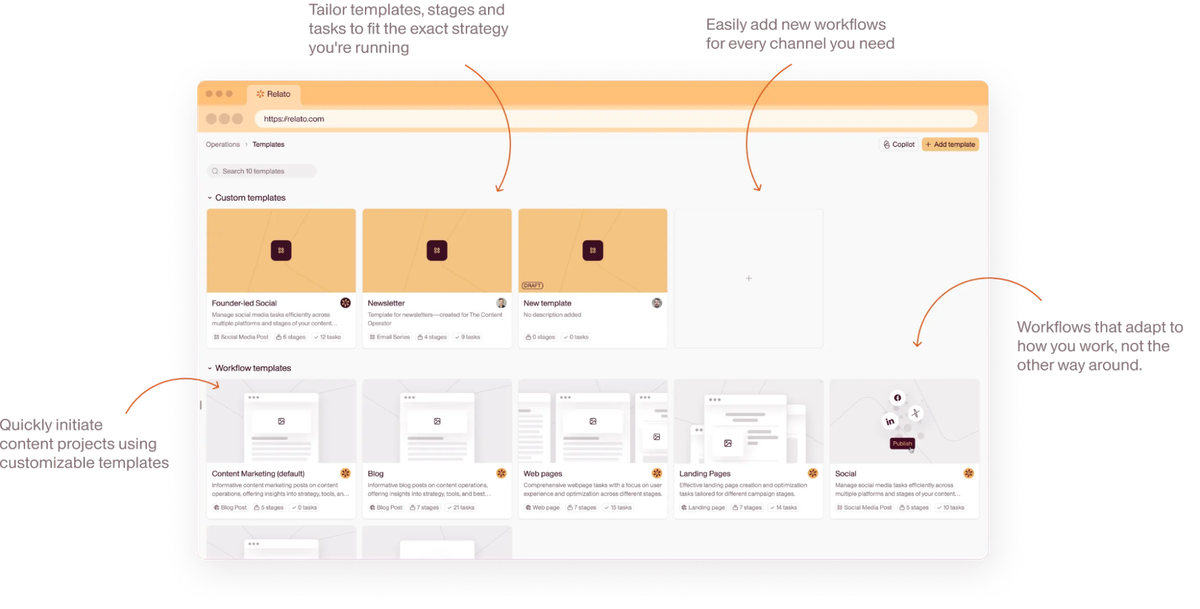
Unlike generic project tools, Relato’s workflows reflect how content production actually works. Writers, editors, and stakeholders know exactly when their input is needed and what’s expected, so nothing stalls and nothing gets missed.
What happens when something shifts?
Deadlines move. Priorities change. The CEO suddenly wants a keynote deck. If ownership is clear from the start, none of this breaks your content system.
Chelsea sums it up:
“If you were aligned at the very beginning, then down the road, anything else shouldn’t really cause too many issues or hiccups when you’re actually operationalizing on that strategy.”
With defined roles, it’s clear who makes the call when things change. The content lead can quickly assess what’s doable, reset deadlines, and keep things moving without confusion or delays.
Without this structure? You get missed deadlines, duplicate work, and endless feedback loops.
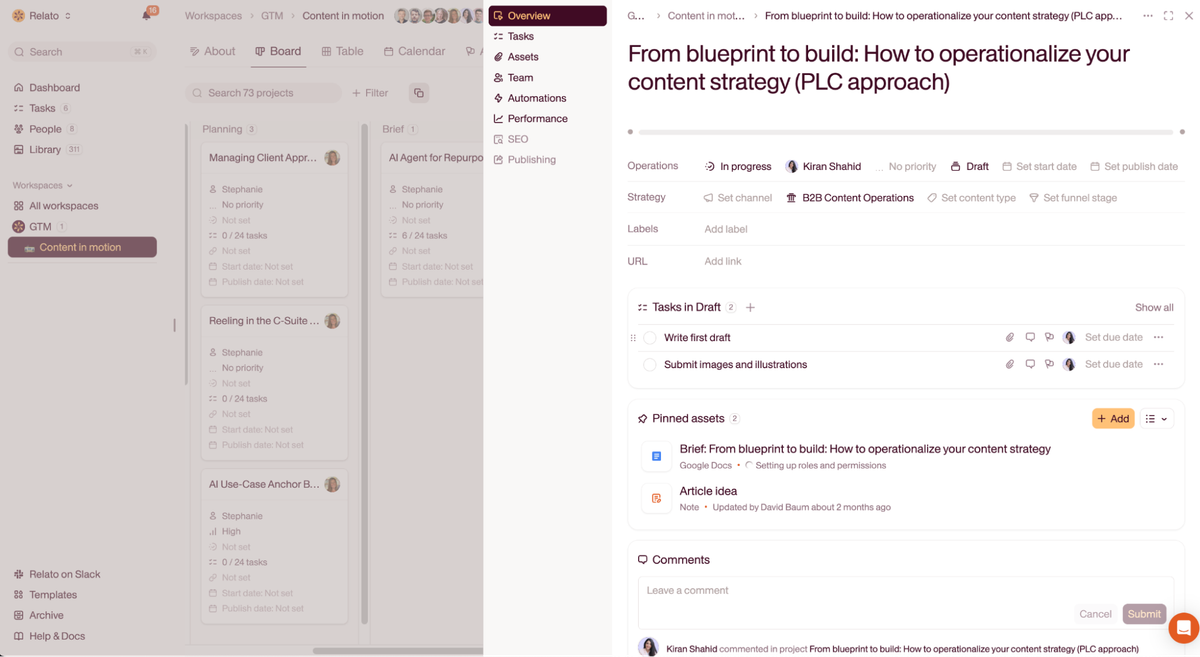
Relato’s workflows are fully customizable. Update tasks, roles, and timelines in seconds. When plans shift (and they will), your team stays aligned without chasing updates across spreadsheets or Slack threads.
Make workflows shape the strategy
Your production process shapes what content gets made, when it ships, and whether it hits your goals.
Here’s how to flip that dynamic and let operations drive better strategy decisions.
Build flexibility into your content calendar
If your workflows are rigid, your strategy gets stale fast. Flexible planning lets you adapt to product changes, adjust timelines, and align formats to support one another without derailing your goals.
At Wistia, Sam deals with this when video production timelines don’t align with blog or social content schedules. His approach is to design workflows that reflect reality.
“Your content calendar needs to be flexible enough to accommodate shifts in the product calendar. The amount of time it takes to write a high-performing blog post has increased while the amount of time to make high-performing videos has decreased, so the production gap between video and text is closing.”
This approach keeps production moving and creates cohesion across formats so the content strategy stays on track even as timelines shift.
Make content work across teams
Automation also helps your content work harder across teams. We asked Janine Anderson, then Zapier’s content operations manager, how her team uses automation in its own content workflows:
“We have an automation set up that watches for articles published that mention partner apps, and then it collects them, stores them, and once a week, releases a digest in a Slack channel so the partnerships team can see what relevant articles we’ve published recently. This saves our team a ton of time and manual effort and keeps the partnerships folks from having to search for things when they’re reaching out to partners.”
By embedding content into your workflows, each piece becomes a repeatable asset, not just a one-off deliverable. (For a pipeline-level view of where AI fits into intake, drafting, review, and distribution, see our breakdown of how to build smarter content systems with AI and automation.)
Use strategy as your decision-making filter
When your workflow includes strategy checkpoints, you don’t have to debate every off-brand request since you’ve already built in the answer.
Chelsea explains it well:
“Your strategy is what you map everything back to. It’s what you use when your CEO is asking you to do something out of left field — you take a step back and say that doesn’t align with your strategy.”
At Relato, we use these checkpoints internally too. If someone suggests a quick-turn content idea that doesn’t map to our core focus areas, like content operations or thought leadership, we can quickly assess and redirect. Because our strategy lives next to every campaign brief, it’s easy to gut-check decisions before execution begins.
Plan for updates from the start
Strong content compounds, but only if the material stays accurate. When you build maintenance into your workflow upfront, you can double down on high performers instead of scrambling to create from scratch.
Skipping this step often means struggling when product features change or stats go stale. Kasey explains:
“One area where we need to make regular content updates involves pieces that cite our original research. When new findings come out, we want to update both types of content with the fresh data and links to the new report. So, it’s crucial to keep track of all the important pieces that mention last year’s version of the report.”
It’s not just for data-driven content. Jennifer shares how the team handles evergreen blog posts:
“If we write a blog for small businesses needing an AI assistant, we’ll measure it after a while. If it’s successful, we’ll go back and frequently update it versus creating net-new content. This helps us continue link building to newer features without taxing the content writers.”
This proactive maintenance approach becomes even more critical when writing about rapidly changing topics. Janine highlights how Zapier turns maintenance challenges into opportunities:
“We build in regular review cycles to make sure articles are still accurate when features change or apps shut down. But sometimes those changes provide an opportunity for us to step in and offer a solution. For example, when Google Calendar removed SMS notifications, we created a piece showing people how to recreate that with a Zap.”
The fix: During briefing, flag any content that includes time-sensitive data, evolving product features, or original research. That tag becomes your update roadmap later without any audits.
How do you run a repeatable weekly content workflow?
Quarterly themes fail quietly when there is no weekly rhythm underneath them. A repeatable week is what turns a calendar from a list of dates into a production system.
The version that survives contact with a real team is short: one planning slot, one briefing slot, one review window, and one publish slot.
| Day | Slot | Who | Output |
|---|---|---|---|
| Monday | Queue check | Content lead | Anything due this week without an owner or a brief gets one, or moves |
| Tuesday | Briefing | Strategist and requester | Next week’s pieces get briefed while the requester is still available |
| Wednesday to Thursday | Review window | Reviewers | Fixed 48 hours, and no response defaults to approve |
| Friday | Publish and log | Publisher | Pieces ship, and each calendar entry gets its live URL and its metric |
Two rules make this hold. Brief a week ahead of production rather than the morning the writer starts, because a brief written under deadline is the one that omits the why. And treat the review window as a window, so late feedback lands in the next cycle instead of reopening a finished piece. Teams that have already built this rhythm tend to look a lot like Rally’s repeatable process, where the cadence carries the load rather than any individual’s memory.
Structuring a calendar when campaigns overlap across brands
Overlapping campaigns are the normal case for most teams, and the usual mistake is one calendar per brand. Separate calendars hide the collisions that actually cost you, which are people and review capacity rather than slots.
Run one calendar with a brand column instead. Give every row an owner, a brand, a campaign, a publish date, and a channel. Then filter by brand for the brand review, by owner to see who is overcommitted, and by week to catch three brands booking the same reviewer on Thursday. The rows that make the calendar should already have earned their place against the campaign goal, which is easier when every idea competes on the same criteria rather than on enthusiasm.
Tracking a calendar when three teams create, approve, and publish
When one team writes, another approves, and a third publishes, “in progress” stops meaning anything useful. Status has to name the boundary a piece is sitting on.
Use handoff states rather than work states: with writer, awaiting approval, approved and queued, published. Each one names who currently holds the piece, so a stalled item points at a person rather than at a stage. Then track two numbers per cycle: how long pieces sit in each state, and how many miss their planned date. The first shows where the queue backs up. The second shows whether the plan was ever realistic. A single slow week is noise, so a quarterly check-in is the right place to act on the pattern.
What systems help you operationalize launch content?
Product launches break content teams in predictable ways. You have a hard date, a half-written brief, three SMEs in three time zones, and a CMO who keeps adding deliverables on Friday afternoon. A general project tracker will not save you here. You need a stack of systems that connect the launch goal to the work that ships.
Here are the five that do the work.
A launch brief tied to the campaign goal. Every launch asset (blog post, demo video, nurture email, sales one-pager, social thread) needs a brief that names the launch date, the audience segment, the angle, and the metric you will track. When the brief lives next to the campaign and the writer can see both at once, the drift stops.
A workflow template for the launch sequence. Pre-launch teaser, launch day announcement, week one deep dive, week four customer proof. Each step gets an owner, a due date, and a review checkpoint. Build the template once. Clone it for the next launch instead of rebuilding from a blank Notion page. When you are launching the company rather than a feature, the teaser phase carries most of the weight, and what to post before you have a product to sell becomes a strategy in its own right.
A shared asset library. Brand kit, product screenshots, demo clips, approved positioning lines, prior launch posts. When SMEs and freelancers pull from one source, you stop rebuilding context every cycle. This is the single source of truth in content marketing that most teams keep meaning to set up.
Cross-team coordination baked into the calendar. Product marketing, demand gen, sales enablement, and content need to see the same dates. Launch slippage is almost always a coordination failure, not a writing failure. If your launch lives in four different calendars, you do not have a launch system.
A maintenance loop after publish. Most teams ship the launch and move on. The launch content that compounds is the content you revisit every quarter as the product evolves, customer language sharpens, and ranking opportunities appear. Tag launch posts at the brief stage so the refresh queue is automatic.
A general project tracker can fake the first two systems. A content native workspace like Relato wires all five together, so the brief, the workflow, the asset library, and the calendar all reference the same launch instead of drifting apart.
If your launch keeps slipping, the fix is rarely “work harder.” It is usually one of these five systems missing or living in the wrong tool. For the broader picture of how systems shape strategy, see why content strategies fail and the practical playbook in content operations, decoded.
Make your strategy executable
The gap between planning and doing is where most content strategies die. But when you design workflows that connect strategic themes to actual deliverables, execution becomes automatic.
It’s easy to get bogged down in the process instead of focusing on creating great content. Sam puts it perfectly:
“Overall, creating content should be a challenging but fun activity. It should be something where curious people are learning and writing about topics they find interesting. If the process is getting in the way of that enjoyment and turning creatives into checkbox marketers, then the process needs to be fixed.”
What makes the difference is building systems that flex as you grow. Janine mentions how Zapier scales without breaking things:
“We are pretty intentional when we set up systems (and we expect to iterate to make them work the way we need them to). We also give everyone the ability to set up their own automated systems to help with the parts of their work where they see the opportunity for more efficiency.”
Instead of drowning your entire content team in spreadsheets and status meetings, Relato removes the friction to streamline your content strategy. Your whole content team gets back to what they love: producing content that reflects your expertise and earns its spot in the buyer’s journey.
The strategy works because the system works. And the work becomes fun again.
Frequently asked questions about operationalizing content strategy
What breaks when content, data, audiences, and campaign workflows live in separate systems?
Four things, in a fairly predictable order. Context stops travelling with the work, so the audience decision made in the brief is gone by the time the email team picks the piece up. Status becomes a question instead of a fact, because nobody can answer whether a piece ships Thursday without asking three people. Reporting cannot be tied back to intent, because performance data arrives per URL while the goal, the audience, and the pillar sit in three other tools. And the same decision gets made repeatedly, because nobody can find the previous version. The fix is smaller than a re-platform: decide which four artifacts have to share a home, namely the brief, the calendar, the asset library, and the performance view.
Why do detailed briefs still get lost between brief and build?
Because a brief is usually treated as a document that gets sent rather than a record that stays open, so three things go missing at the handoff. The reasoning behind the decisions, since briefs record what to do and rarely why. The constraints nobody wrote down, like legal wording or an unreleased product name, which live in Slack and get rediscovered in review. And the definition of done, since the brief names one metric and each channel tool applies its own. Link the brief to every downstream asset instead of pasting excerpts into each tool, keep the why next to the what, and put the acceptance criteria in the brief itself.
How do you run a repeatable weekly content workflow?
Four fixed slots. A Monday queue check where anything due this week without an owner or a brief gets one or moves. A Tuesday briefing session for next week’s pieces, held while the requester is still available. A review window of about 48 hours mid-week, where no response defaults to approve. And a Friday publish slot where pieces ship and each calendar entry gets its live URL and its metric. Two rules make it hold: brief a week ahead of production rather than the morning the writer starts, and treat the review window as a window so late feedback lands in the next cycle.
How do you structure a content calendar when campaigns overlap across brands?
Run one calendar with a brand column rather than one calendar per brand. Separate calendars hide the collisions that actually matter, which are people and review capacity rather than slots. Give every row an owner, a brand, a campaign, a publish date, and a channel, then filter by brand for the brand review, by owner to see who is overcommitted, and by week to catch three brands booking the same reviewer on the same day.
What systems help operationalize launch content?
Five systems do the heavy lifting. A launch brief that names the launch date, the audience, the angle, and the metric. A reusable workflow template for the launch sequence (teaser, launch day, week one deep dive, week four customer proof) with an owner and a due date on every step. A shared asset library for brand kit, product screenshots, demo clips, and approved positioning. A single calendar that product marketing, demand gen, sales enablement, and content all see. And a maintenance loop that revisits launch content every quarter as the product changes. A general project tracker can fake the first two; a content native workspace like Relato wires all five together.
How do you operationalize a content strategy?
Translate the strategy into three concrete artifacts: a brief template that names the audience and the campaign goal, a workflow template with owners and deadlines for every step from outline to publish, and a calendar that maps quarterly themes to specific deliverables. The strategy stops being a slide deck the moment those artifacts live next to the work and get updated weekly. Most teams skip the artifacts and wonder why execution stalls.
How do you operationalize a product launch content workflow?
Start with the launch date and work backwards. Block out four phases: pre-launch teasers (two to four weeks out), launch day announcement (blog, email, social thread, sales one-pager), week one deep dive (demo video, customer story, webinar), and week four reinforcement (case study, comparison piece, refresh of the launch blog). Each phase has a named owner, a brief tied to the launch goal, and a review checkpoint. Clone the template for every launch instead of rebuilding it.
How do you operationalize AI visibility data across content teams?
Pick one signal source (a tool like Profound, Ahrefs Brand Radar, or a Looker dashboard fed by SERP and LLM crawls), assign one owner who reviews it weekly, and feed two outputs back into the workflow: a list of pages to refresh because they are losing visibility, and a list of new questions to brief because they are showing up in AI answers. Without an owner and a refresh loop, the data sits in a tab and changes nothing.
What is the difference between a content strategy and content operations?
Content strategy answers what, why, and for whom. Content operations answers how it gets made, by whom, by when. The strategy lives in a document; the operations live in the briefs, workflows, calendars, and asset libraries that make the document real. A team can have one without the other, and most do. Operationalizing means closing that gap.
Turn your strategy into shipped content.
Relato bridges the gap between planning and execution with workflows that actually work.