Content operations platform vs CMS vs project management tool
A content operations platform, a CMS and a project management tool are complementary rather than competing. Here is a keep, add or replace verdict for each, and a decision path by team size and content volume.
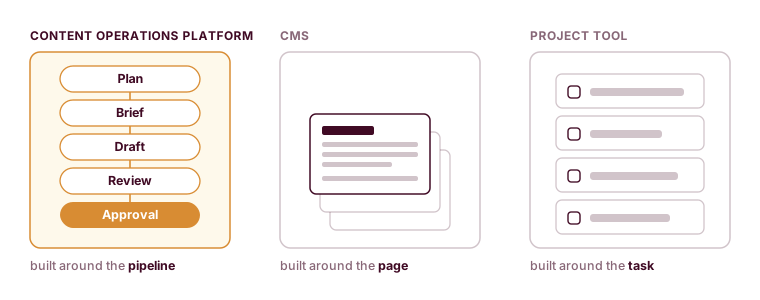

You already have a CMS. Odds are you already have Notion or Asana too. So the real question is rarely what a content operations platform is. It is whether you should add one, and what it changes about the tools you already run.
The short answer is that a content operations platform runs the pre-publish workflow, planning through review and approval, as one connected pipeline. For the full breakdown of the category, the roles around it and where it fits, see our explainer on what a content operations platform is. This guide is narrower. It gives you a verdict for each tool you might be weighing, a decision path keyed to your team size and how much you publish, and the real cost of getting the call wrong in either direction.
Do these three tools compete, or stack?
They stack. This is the part most comparison guides get backwards, and it decides everything downstream.
A CMS sits at the bottom of the stack. It stores and renders your published pages, and that job runs from the moment a piece goes live. A content operations platform sits on top of the CMS and runs everything upstream of publish: the plan, the brief, the draft, the review and the approval. A project management tool sits off to the side, tracking generic tasks and dates for work that may or may not be content. The three of them touch the same team, but they own different slices of the timeline.
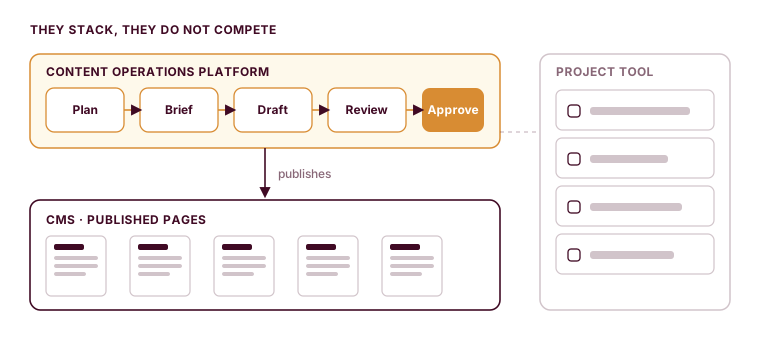
Once you see the stack, the buying decision shrinks. Nobody chooses between a CMS and a content operations platform, because they do opposite jobs and you keep the CMS regardless. The only live decision is what runs the pre-publish layer: a general project tool plus a pile of docs, or a dedicated content operations platform. Everything below is about that one choice.
Keep it, add it, or replace it: the verdict for each tool
Here is the direct call for each tool a B2B marketing team tends to have in hand.
A CMS: keep it, always. WordPress, Contentful and Sanity are built around the published page, and nothing else in the stack does that job. A content operations platform never replaces a CMS. If a vendor pitches one as a CMS swap, that is a sign the product does not understand the stack it is selling into.
A project management tool: keep it for general work, outgrow it for editorial. Notion, Asana and Trello track tasks, dates and assignees well, and plenty of non-content work belongs there for good. What they cannot do is model an editorial stage. A “ready for review” card tells you someone moved a card, and it says nothing about whether the draft is actually ready, whether the brief was followed, or whether the reviewer ever opened it. At low volume that gap is harmless. Once editorial stages have to live somewhere the tool understands, the project tool stops being the right home for the workflow, even while it stays useful for everything else. That is the call Walks and Devour made for 2,000+ content assets when their editorial programme outgrew the board it was sitting on.
A content operations platform: add it when the seam breaks. It runs the pre-publish lifecycle as one object, with a review gate that actually holds a piece until sign-off. You add it on top of the CMS, feeding the finished piece down into it. You add it because the coordination cost of running content across a project board, a docs folder and Slack has started to outweigh the price of a dedicated tool.
The deeper reason to give that pre-publish work its own layer is that it is a function in its own right, with its own stages and its own review gate. Robert Rose, whose book Content Marketing Strategy makes the same case, describes the shift this way:
“It's making content a strategic function in the business, much like you would marketing or sales or legal or comms or really any other part of the business.”

Once content is that kind of function, it needs a home built around the function, which is the one job a general project tool was never designed to do.
| Tool | Verdict | Keep it because | You outgrow it when |
|---|---|---|---|
| CMS (WordPress, Contentful, Sanity) | Keep, always | It stores and renders published pages, and nothing else in the stack does that | Never for storage; a platform sits on top of it rather than replacing it |
| Project tool (Notion, Asana, Trello) | Keep for general work, outgrow for editorial | It tracks tasks, dates and assignees well at low volume | Editorial stages, briefs and drafts need a home the tool understands, and review has to be a gate rather than a status label |
| Content operations platform (Relato) | Add when the seam breaks | It runs the pre-publish lifecycle as one object with a real review gate | It does not store or render pages, so you run it on top of the CMS |
Run your content pipeline in one workspace.
Relato plans, drafts, reviews and approves your content on top of the CMS you already run.
Which one do you actually need right now?
The honest version of this comparison is that most teams need less than a vendor wants to sell them, right up until the day they need more. The deciding factors are how many people touch a piece, how much you publish, and where the workflow actually breaks.
| Your team | Monthly volume | Where it breaks | What to run |
|---|---|---|---|
| 2 to 3 people | Under 5 pieces | Rarely breaks; one person holds the status in their head | CMS plus a spreadsheet or a project tool. Hold off on a platform. |
| 4 to 8 people | 5 to 10 pieces | Context starts dropping at handoffs | A project tool holds if review is not yet a bottleneck. Watch the seam. |
| Any size | 10 or more in flight, or review is a standing bottleneck | The editorial workflow itself | Add a content operations platform on top of the CMS |
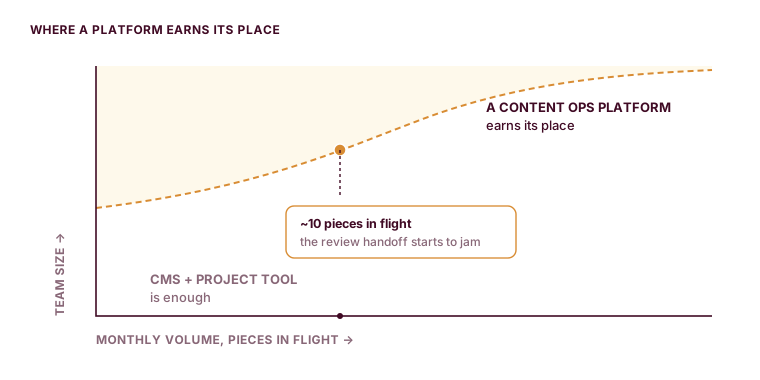
Read the middle row carefully, because that is where most teams sit and where the wrong call gets made in both directions. Some teams buy a platform at five pieces a month and leave it half-used, because the coordination problem it solves had not arrived yet. Others stay on a project tool at fifteen pieces a month and lose an hour a day to reconstructing status, because the tool still technically works and nobody drew the line.
The clearest signals that you have crossed from the middle row into the bottom one:
- More than five people touch a piece before it publishes, and context gets lost at every handoff, which is where content friction starts costing real days.
- Nobody can say what publishes next week, and who owns it, without calling a meeting.
- Review gets skipped because it lives in a comment thread that scrolls out of history.
- The same information, status and dates and ownership, lives in three tools and disagrees with itself.
That last one is the tell. When the spreadsheet, the project board and the CMS each claim a different truth about what is published, the team is paying for a workflow layer it does not have.
What each tool costs you to not have
Every one of these tools has a cost when you skip it, and the costs are not symmetrical.
Skip a CMS and you have nowhere to store and serve pages, which is why nobody skips it. Skip a content operations platform when you have outgrown the project tool, and the cost is the coordination tax: the hours each week spent chasing status, the reviews that quietly get skipped, the pieces that stall in the gap between “draft done” and “someone looks at it.” That tax is invisible on any invoice, which is exactly why teams pay it for a year longer than they should. It shows up as a content lead who spends the first hour of every day working out where things are, rather than moving them forward.
That first hour is the coordination tax made visible, and coordination turns out to be most of the job. Robert Rose puts the proportion bluntly:
“Ninety percent of content strategy has nothing to do with content; it is everything about how we communicate and collaborate together.”
When that coordination has no home of its own, the team absorbs it as lost time, which is the tax this section is about.
The reverse mistake has a cost too. Add a content operations platform before the coordination tax is real, and you have bought a tool that solves a problem the team does not feel yet. It sits next to the project board instead of absorbing the work, and adoption stalls because the pain that would drive people to change their habits is not there. Buying early is how good tools go unused.
Switching cost is smaller than teams fear, and that fear is the main reason they stay put. Moving off a project tool does not mean ripping anything out on day one. You move the live lifecycle first, the briefs, the drafts in flight and the review state, and you keep the CMS exactly where it is as your system of record. The project tool can stay for non-content work. Because the three tools stack rather than compete, you are adding to the top of the stack rather than rebuilding the whole thing.
When is it time to add a content operations platform?
Put the CMS aside; it is a given at every stage. The decision is only ever project tool versus content operations platform for the pre-publish layer, and volume plus coordination cost settles it.
Below roughly five people touching a piece, or a dozen pieces a month, a CMS plus a project tool plus a shared calendar usually holds, and buying more is premature. Once you pass ten pieces in flight, or review becomes a standing bottleneck, the project tool is the thing you have outgrown, and the coordination tax is already costing you more than the platform would.
If that describes your team, the move is to put the lifecycle in one place and run the full pre-publish workflow in a single workspace, sitting on top of the CMS you already trust. If it does not describe your team yet, keep the project tool and revisit when the signals above start showing up. Relato is the AI content operations platform we run our own content team on, so the line we draw here is the same one we drew for ourselves.
Put the pre-publish work in one place.
Relato runs the plan, brief, draft, review and approval as one pipeline, on top of the CMS you already trust.