What is a content operations platform?
A content operations platform runs the whole content lifecycle, plan to publish, in one workspace. Here is what the software category is, how it differs from a CMS, a project tool and a writing assistant, and how to choose one.
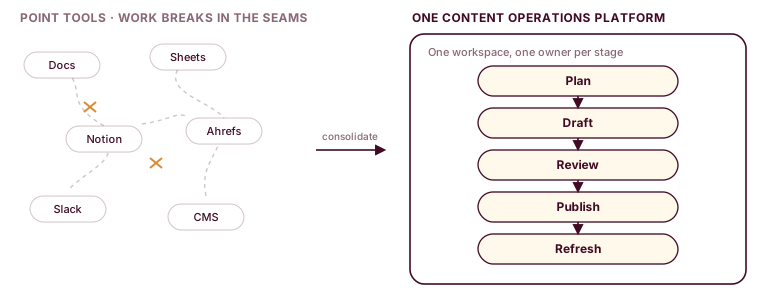

The brief lives in a Google Doc. The calendar is a Notion board someone stopped updating in March. Drafts move through Google Docs comments, SEO checks happen in a separate Ahrefs tab, approvals are a Slack thread that scrolls out of history, and the published post lands in a CMS nobody opens until the next edit. Each tool does its one job well. The work between the tools is where things break.
A content operations platform is the software category built to close those gaps: one workspace for the full lifecycle, from backlog to published, with a single owner and a single stage per piece. Below is what it is, what it does, how it differs from the tools you already run and how to tell a real one from a rebranded project tracker.
What a content operations platform actually is
A content operations platform is the software a marketing team uses to plan, produce, review and publish content from one place. The defining move is that it treats the whole content lifecycle as the unit of work, not a single stage. A piece of content is one object that carries its brief, its draft, its review state and its history as it moves, rather than a task in one tool and a document in another.
It helps to separate two things that share a name. Content operations is the function: the people, process and tooling that let a team ship content on a repeatable schedule. A content operations platform is the software layer of that function. You can run content operations with no dedicated platform at all, on a pile of docs and a spreadsheet, and most teams start there. The platform is what you adopt when that pile stops scaling. For the people and process side, the pillars, roles, staffing and distribution model, see our companion piece on the content operations framework; this article is about the software category.
The category exists for a specific reason: teams have too many tools, and none of them knows what the others are doing. That gap is not free, and the hidden costs of content friction show up as chased status updates, duplicated drafts and deadlines that slip a day at a time.
What a content operations platform does
Described as capabilities rather than promises, a content operations platform does five concrete things.
- Holds the plan next to the work. Pillars, calendar and briefs live in the same place as the pieces they produce, so a brief is attached to a draft, not pasted into a doc that drifts out of sync.
- Assigns each stage to an owner. Every stage of a piece, research, draft, edit, SEO, publish, has one owner and one current status, so nothing sits in the ambiguous state of “someone is probably on it.”
- Blocks publish until review clears. The workflow gate is real, not a status label a person can quietly skip. A piece cannot reach published until its review stage is signed off.
- Keeps the history. Who did what, at which stage and when. When a post underperforms, you can see how it was made instead of guessing.
- Schedules refreshes. Published content decays. A platform can queue a refresh on a cadence so pages get updated on purpose, not when someone happens to notice a ranking slide.
We run this on our own site. relato.com uses the same content refresh loop we sell, driven by the content-refresh job in the platform, and the ten Claude Skills for content operations we published mirror the internal stages a piece passes through. Writing about the category from inside it is the point: the claims here are things we operate, not features on a slide.
That number is the whole argument for the category. Adding a tenth tool to a nine-tool stack rarely fixes a workflow problem, because the problem lives in the seams between tools, not inside any one of them.
How teams arrive here: the content operations maturity curve
Nobody buys a content operations platform first. Teams grow into the need through three stages, and each stage works until a specific thing breaks. Recognizing which stage you are in is the fastest way to know whether the platform is the answer or a premature purchase.
Stage one is docs and a spreadsheet. A founder or a first content hire runs the whole calendar in a Google Sheet, drafts in Docs and tracks status in a column. This is the right tool at the start, and it holds up to roughly five pieces in flight. It breaks when two people need to know the status of the same piece at the same time and the spreadsheet says “in progress,” which tells them nothing.
Stage two is project-tool bolt-ons. The team adopts Notion, Asana or Airtable, wires a few Zapier steps between the tracker and the CMS, and calls it a workflow. This adds task tracking, dates and assignees, and it feels like progress. It breaks at the handoff: the project tool follows the task but knows nothing about editorial stages, so a draft can be marked “done” while review never happened, and the brief still lives in a separate doc that the tracker cannot see.
Stage three is a content operations platform, where the lifecycle itself is the unit and the brief, draft, review state and publish status travel together as one object. Most teams do not reach stage three because the stage-two setup is good enough to limp along, which is exactly the trap. The content strategist Robert Rose describes the same stall from the enterprise side.
“Most marketing organizations are stuck on the second rung of a four-rung ladder, and stepping up is harder than it looks from the outside.”

Consider a concrete case: a six-person B2B SaaS marketing team running maybe fifteen pieces a month across blog, product marketing and a nascent SEO push. They are firmly in stage two. The content lead spends the first hour of every day reconstructing status from Slack, the Notion board and three open Google Docs, because no single surface tells her where anything is. The work is not the bottleneck. The reconstruction is.
The move to stage three does not add a tool to that team. It removes several, by making the piece itself the thing the software tracks. The chart below is the shape of the progression: capability against the volume a team is trying to run, with the ceiling where each stage gives out.
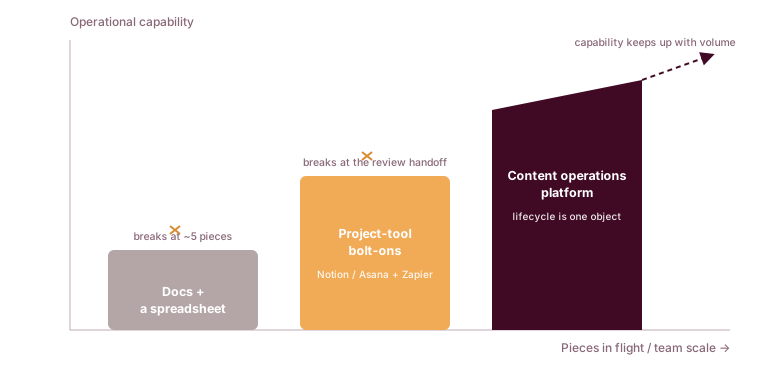
Stage three earns its keep for one reason: the coordination cost stops growing with volume. In stages one and two, every additional piece adds handoffs, and handoffs are where context leaks. When the piece carries its own state, adding the sixteenth piece costs about what the fifteenth did. That is the whole economic case, and it is why the maturity question (“what breaks next?”) is more useful than a feature list.
For the argument that content should be run as an operated function in the first place, rather than a series of one-off campaigns, it is worth hearing it made directly.
How it differs from a CMS, a project tool and a writing assistant
The fastest way to understand a content operations platform is by what it is not. Four adjacent categories get confused with it, and each owns a different slice of the work.
A CMS stores and renders published content. Cloudinary defines a content management system as software that helps users “create, manage, and modify website content,” and that is where its job ends: at the published page. A content operations platform runs the work before publish and hands the finished piece to the CMS. A general project tool like Notion or Asana tracks tasks, dates and assignees, but it does not model editorial stages or block a publish on review, because it was built for generic work, not content. A writing assistant such as Jasper or Copy.ai owns the drafting stage and nothing around it. And a digital asset management system, which Cloudinary describes as “a central repository that allows you to store, organize, and retrieve rich media,” manages the files, not the workflow that produces them.
| Tool category | What it is built to do | What it does not do |
|---|---|---|
| CMS (WordPress, Contentful, Sanity) | Store and render published pages and web content | Manage the pre-publish workflow, briefs or stage ownership |
| Project tool (Notion, Asana, Airtable) | Track tasks, dates and assignees | Model editorial stages, gate publish on review, hold briefs and drafts as first-class objects |
| Writing assistant (Jasper, Copy.ai) | Draft and rewrite copy | Run the stages around the draft: research, review, SEO, publish, refresh |
| DAM (Bynder, Aprimo) | Store, organize and retrieve rich media assets | Move a piece from backlog to published through review |
| Content operations platform (Relato) | Run the whole lifecycle as one unit, plan to refresh | Replace your CMS or DAM; it coordinates the work that feeds them |
The honest version of this: a content operations platform does not replace your CMS or your DAM, and it should not try to. It sits above them and coordinates the work that ends up in them. If a vendor pitches a content operations platform as a CMS replacement, that is a category error worth questioning. For the buying decision itself, whether to keep, add or replace each of these tools by team size and content volume, see content operations platform vs CMS vs project management tool.
Who buys it, and who it serves
A content operations platform is bought by a committee even when only one person fills out the form. Three roles have a stake, and a platform that ignores any of them stalls in evaluation. Naming them is useful because the tool has to answer a different question for each.
The head of content or VP of marketing is the economic buyer. They own the outcome (published content on a schedule, tied to pipeline) and the budget, and the question they ask is whether the platform makes the team’s output more predictable without adding headcount. Rally UXR is that answer with numbers attached: one content marketer, a few freelancers, and 3-4 blogs a month on a repeatable process. The content operations lead is the day-to-day user and the internal champion. They feel the tool sprawl most acutely, because they are the person reconstructing status every morning, and the question they ask is whether the platform removes coordination work rather than adding a place to log it. Marketing operations or RevOps is the integration gate. They do not use the tool daily, but they have veto power over anything that touches the CMS, the CRM or analytics, and the question they ask is whether the data flows cleanly and nothing becomes a new silo.
Serving the user well is the part teams underrate, because the user is the one who lives with the friction, and friction is where good tools quietly fail. Andrea Fryrear, who studies how marketing teams actually work, makes the point that speed is not the goal that matters most.
“You associate agility with speed so much that it can get overlooked that it's about sustainable pace and people being able to not work themselves into the ground.”

That is the difference between a platform and a faster treadmill. A tool that helps a team publish more without a sustainable pace produces burnout, not throughput. For the user, the capability that matters is that the mechanical work stops landing on a person at the wrong time.
Here is the handoff that breaks in the six-person team from earlier. A writer finishes a draft on Friday and marks it “ready for review” in Notion. The editor is out until Wednesday. The brief is in a Doc the editor never opened, the SEO notes are in an Ahrefs tab nobody shared, and by Wednesday the writer has moved on to the next piece and lost the context. The draft ships late, or worse, it ships on Tuesday because someone flipped the status to “published” to hit the calendar, and review never happened.
No individual failed. The seam between “draft done” and “review” had no owner and no memory. A platform that holds the brief, the draft and the review gate as one object closes exactly that seam, which is why the integration gate and the user tend to agree once they see it.
Where AI agents fit, and where they do not
The newer shape of the category is the AI content operations platform, and this is the part still up for grabs. The idea is narrow and specific: assign the mechanical stages of the lifecycle to AI agents that work inside the same board as the team, rather than in a separate tool a person has to babysit. Research, SEO checks, internal linking, fact checking, brief drafting and refresh scheduling are the stages that reward automation, because they are repeatable and checkable. Creative direction, the angle, the argument, the final yes, stays with the team. The stage-by-stage version of that split is our guide to where agents fit in the pre-publish workflow.
The distinction that matters is where the agent lives. An agent inside the workflow picks up a stage, does the mechanical work and hands the piece to the next owner, human or agent, with the state intact. A “Zapier chain calling an API” sits outside the workflow and fires blind: it has no view of the stage, no ability to hold the piece until a check passes and no history when it goes wrong. Both use AI. Only one is content operations. For the product view of how those agents attach to stages, see our page on AI content operations.
This will not fix a thin editorial calendar, and it will not replace editorial judgment. Agents move the routine work faster; they do not decide what is worth writing. A team with no strategy and a pile of agents produces more mediocre content, sooner. The value shows up only when the mechanical load was the actual bottleneck, which for a marketing team of 3 to 15 running nine tools, it usually is.
What migrating off the point-tool stack involves
The most common reason a team stays in stage two is fear of the migration, so it is worth being specific about what it actually takes. It is not a rip-and-replace, and treating it as one is how migrations fail. The move is sequenced, and the order matters.
Start with an inventory. Write down what each tool actually holds: the Notion board holds status and dates, the Docs hold briefs and drafts, Ahrefs holds the SEO checks, Slack holds the approvals that scroll out of history, the CMS holds published pages. Most teams discover in this step that the same information lives in three places and disagrees with itself, which is the sprawl made visible.
Then move the lifecycle first, not the archive. The thing you migrate is the live work: briefs, drafts in flight, review state and publish status, reattached to each piece as one object. You do not need to import three years of old Google Docs on day one. The brief becomes the anchor that everything else hangs off, which is the single change that makes the rest cohere. Keep the CMS and the DAM exactly where they are, because they are systems of record and the platform is meant to feed them, not replace them.
The messy middle is real, and pretending otherwise is how trust erodes. For a few weeks two systems run in parallel while the team builds the habit of updating status in one place instead of five, and someone has to own enforcing that. The project tracker and the Zapier chains come out last, once the workflow genuinely runs in the platform, not on the first day out of optimism. A team that retires the old tools too early, before the new habit holds, ends up reconstructing status in Slack again, which is the exact problem they left.
How to choose a content operations platform
Most evaluation guides list features. A more useful test is five questions that separate a real content operations platform from a point tool wearing the label.
- Does it cover the full lifecycle, or re-skin one stage? If the product is mostly a better editor or a nicer calendar, it is a point tool. The category claim is the whole lifecycle as one unit.
- Does every piece have one owner and one current stage? If a piece can be in two states at once, or in none, the workflow model is a task list, not a content system.
- Can it block publish until review clears? A status dropdown anyone can override is not a gate. Ask to see the enforcement, not the label.
- Do AI agents live inside the workflow, or bolt on through an external automation? An agent that cannot see the stage or hold the piece is a shortcut, not an operator.
- Does adopting it remove tools from your stack, or add one more? The point of the category is consolidation. If the platform sits next to your nine tools instead of absorbing several of them, it is making the sprawl worse.
None of this is a promise that the software fixes your content. It is a way to check that the tool matches the category it claims. We built Relato to answer those five questions in the affirmative, and the fastest way to judge that is to run the full content lifecycle in one workspace against a piece you already have in flight.
Keep reading
More on running content operations as one system, grouped by where the work tends to break.
Framework and function
- The content operations framework
- How to operationalize your content strategy
- Building a single source of truth for content
- When to hire a head of content operations
Team and roles
- Content team roles, and how they change by stage
- How to align distributed content teams
- How to define content ownership
Freelance bench
- From freelancer to content partner
- How to onboard freelance writers
- Working with strategy-led freelancers
- The everyday pains of the content marketing freelancer
Strategy and planning
Tool comparisons
- Content operations platform vs CMS vs a project tool
- Zapier alternatives for content teams
- n8n alternatives for content teams
- Relay.app alternatives for content teams
See what running the whole lifecycle in one workspace looks like.
Book a 30-minute walkthrough of Relato. No prep needed and no commitment on the first call.
Sources
- 2026 content operations statistics, Digital Applied (citing Content Marketing Institute 2026, Gartner CMO survey, Welcome State of Content Ops): median of 9 platforms per team, top-decile of 7, agentic vs manual approval times, agentic adoption rate.
- DAM vs CMS, Cloudinary: definitions of a CMS and a DAM and the boundary between them.
- From Content Factory to Media Operation: A Maturity Model for 2026, Content Marketing Institute (Robert Rose): quote on organizations stuck on the second rung of a four-rung maturity ladder.
- Power Players: Andrea Fryrear on marketing as a Trojan horse for Agile adoption, Aprimo: quote on agility being about sustainable pace, not only speed.